 DOWNLOAD Win
 DOWNLOAD Mac
Best MP4 Downloader for Mac: Download Videos in 4K & 8K
 Tessa Kirkland
- 29 September, 2026
- Blog
Looking for an MP4 downloader for Mac to save online videos for offline viewing? The right tool can make it easy to download videos as MP4 while giving you control over video quality, subtitles, audio tracks, and output settings.
In this guide, we'll explain what to look for in an MP4 downloader for Mac, compare desktop software with online video downloaders, and show you how to download videos as MP4. We'll also cover 4K and 8K downloads, website compatibility, and common problems you may encounter.
1. What Is an MP4 Downloader for Mac?
An MP4 downloader for Mac is a tool that lets you save online videos as MP4 files directly to your Mac. Instead of watching a video only through a website, you can download a copy for offline playback, editing, or personal use.
Most MP4 downloaders work by letting you paste a video URL, choose MP4 as the output format, select the video quality, and start the download. Depending on the tool and website, you may also be able to download videos in 1080p or 4K, save subtitles, or download multiple videos at once.
For Mac users, a good MP4 downloader should be easy to use, compatible with your macOS version, and support the websites and video quality you need.
2. How to Choose an MP4 Downloader for Mac
MP4 Output and Video Quality
Video quality is another important factor to consider. A good MP4 downloader for Mac should let you choose the available quality, such as 720p, 1080p, or 4K,, rather than forcing you to download a lower-resolution version. It is also worth checking whether the tool preserves the original audio and video quality when saving the file as MP4.
Supported Websites
Before choosing an MP4 downloader for Mac, check whether it supports the websites you actually use. A downloader may work well with one platform but fail to detect videos from another, especially when websites use different video formats or streaming technologies.
Make sure the MP4 downloader supports the websites you regularly use. Some downloaders only work with a limited number of platforms, while others support a wider range of streaming services, video-sharing platforms, live streaming sites, and social media websites. Choosing a downloader with broad website support means you can use one tool to save videos from different sources instead of switching between multiple downloaders.
macOS Compatibility
Make sure the MP4 downloader is compatible with your Mac and the version of macOS you are running. Before installing it, check the supported macOS versions and system requirements, and confirm that it works with your Mac model, especially if you have a newer Apple Silicon Mac.
Good macOS compatibility helps prevent installation problems, crashes, or other issues during downloads. It is also worth checking whether the downloader receives regular updates to keep up with newer macOS versions.
Download Speed and Batch Support
Download speed becomes more important when you need to save long videos, playlists, or multiple files. A good MP4 downloader should make efficient use of your internet connection and, ideally, let you download multiple videos without having to process each one manually.
Ease of Use and Safety
A good MP4 downloader should be easy to use without requiring complicated settings or command-line knowledge. It is also worth choosing software from a trusted source and avoiding downloaders that rely on excessive pop-ups, misleading download buttons, or unfamiliar third-party installers.

How to Download MKV Movies in HD Quality [Free Movie Websites in 2026]
Looking to download MKV movies for offline viewing? Discover trusted MKV movie downloaders, including desktop apps and online sites.
3. Best MP4 Downloader for Mac
If you are looking for an easy way to download videos as MP4 on your Mac, FlixiCam StreamOne is a option worth considering. It supports 1,000+ websites, including major streaming services, live streaming platforms, and social media sites. It lets you save online videos in MP4 or MKV format and choose the quality you need for convenient offline playback on your Mac.
It also supports 10X speed and batch downloads, making it easier to save multiple videos or longer content for offline viewing. With a straightforward interface and Mac support, you can paste a video URL, select your preferred format and quality, and start downloading without complicated settings.
Main Features:
- Broad website support: Download videos in MP4 or MKV from 1000+ sites, including Netflix, Disney+, Amazon Prime, YouTube, Crunchyroll, TikTok, and more.
- Flexible video quality: Download online videos, TV shows and movies in up to 1080p.
- YouTube 8K downloads: Download YouTube videos in up to 8K resolution for an ultra-high-quality viewing.
- Multilingual subtitles and audio: Support downloading subtitles & audio tracks in multiple languages.
- Fast downloads: 10X download speed for efficient saving.
Compatibility: macOS 11 or later, Windows 10/11.
Step 1 Open StreamOne and Choose a Website
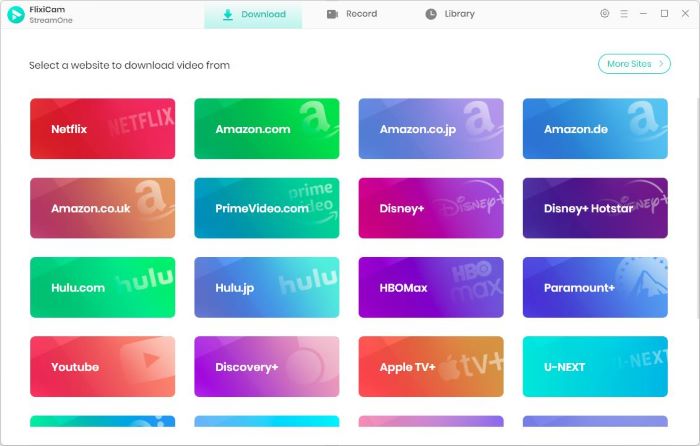
Download and install FlixiCam StreamOne on your Mac and launch the program. Click the “Switch Website” icon next to the address bar, then select the website where your video is hosted.
Step 2 Find the Video You Want to Download
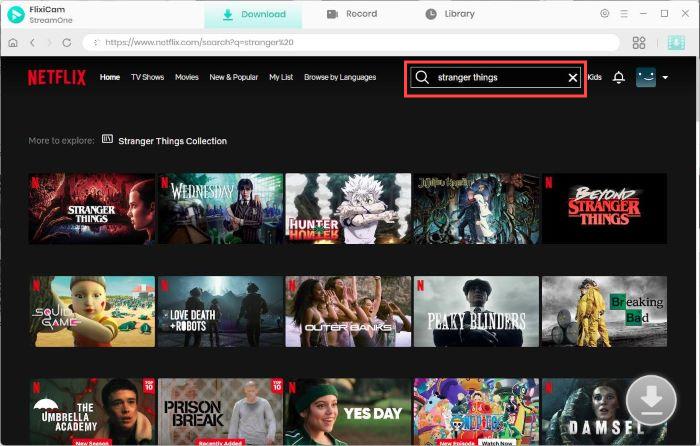
StreamOne comes with a built-in browser, so you can search for and play videos directly within the program. Enter the title in the search bar or browse the website to find the movie, TV show, or other video you want to save as MP4.
Step 3 Choose MP4 and Set Your Preferences
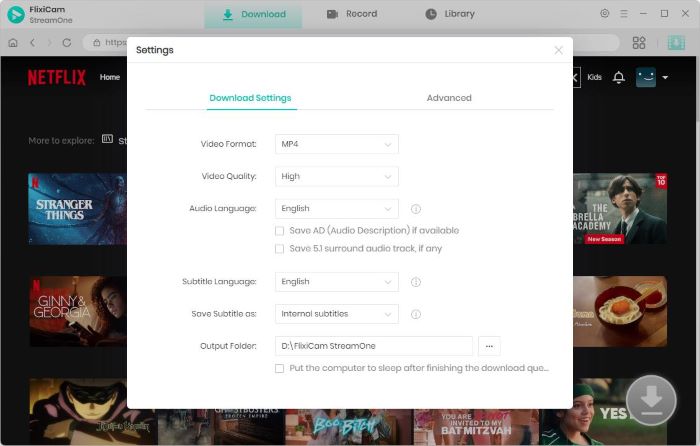
Open the Settings window to configure your download preferences. Select MP4 as the output format, choose your output folder, and adjust other available options such as subtitle settings before downloading.
Step 4 Select Video Quality, Audio, and Subtitles
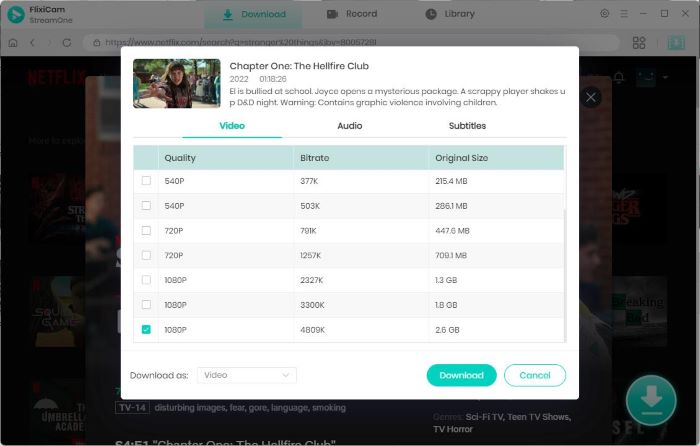
Play the video and click the Download button to open the download panel. Select the available video quality, audio track, and subtitle language you want to keep, then confirm your choices before starting the download.
Step 5 Download the Video as MP4
Click Download to start saving the video to your Mac. You can check the download progress and remaining time in the sidebar. When the download is complete, open the Library section to find your MP4 videos and play them offline.
4. FlixiCam MP4 Downloader for Mac vs. Online Video Downloaders
Online video downloaders can be convenient when you only need to save an occasional video, but they may have limitations when you need better quality, batch downloads, or support for multiple websites. A desktop MP4 downloader such as FlixiCam StreamOne provides more download options and a more consistent workflow on Mac.
| Feature | FlixiCam StreamOne | Online Video Downloaders |
|---|---|---|
| Installation | Requires installation on Mac | Works directly in a web browser |
| Website Support | Supports 1,000+ websites | Varies by website and service |
| Output Formats | Supports MP4 and MKV | Usually offers fewer format options |
| Video Quality | Up to 8K for supported YouTube videos; up to 1080p for most other supported sites | Quality options vary by website and downloader |
| Batch Downloads | Supports batch downloads and multiple videos | Often limited or unavailable |
| Download Speed | Supports speeds of up to 10X | Depends on the website, server, and service |
| Subtitles & Audio Tracks | Supports available subtitles and multiple audio tracks | Support varies by service |
| Ads & Pop-ups | Desktop interface without third-party download-page pop-ups | Some sites may contain ads, pop-ups, or multiple download buttons |
| Best For | Regular downloads from multiple websites | Occasional downloads without installing software |
FAQs about MP4 Downloader for Mac
What is the best MP4 downloader for Mac?
The right MP4 downloader for Mac depends on the websites you use, the video quality you need, and whether you want features such as batch downloads and subtitle support. For users who regularly download videos from multiple websites, FlixiCam StreamOne supports 1,000+ websites, MP4 and MKV output, and high-quality downloads, including up to 8K for supported YouTube videos.
Can I download 4K videos as MP4 on Mac?
Yes. You can download 4K videos as MP4 on Mac as long as the source video is available in 4K. If you use FlixiCam StreamOne to download YouTube videos, you can download supported videos in up to 8K resolution for high-quality offline viewing.
Can I download videos from any website as MP4 on Mac?
Not necessarily. Video downloaders differ in the websites and content they support, and some websites use technologies such as DRM or other access restrictions that prevent direct downloading. If you regularly download videos from different platforms, choose a Mac downloader with broad website support. FlixiCam StreamOne supports more than 1,000 websites, covering most of your everyday video downloading needs.
Is it safe to use an MP4 downloader on Mac?
An MP4 downloader can be safe to use when you get it from a trusted source and avoid suspicious download pages, misleading buttons, or unknown installers. Online download sites may also contain ads or pop-ups, so check the website carefully before downloading anything. For desktop software, download the installer from the developer's official website and keep the application updated. Also, make sure you have the right to download and use the content you save.
Conclusion
Choosing an MP4 downloader for Mac depends on the websites you use, the video quality you need, and how often you download videos. Online downloaders can be convenient for occasional downloads, while desktop software can provide broader website support, batch downloads, and more control over output settings. If you regularly download videos from different websites, FlixiCam StreamOne supports more than 1,000 websites, MP4 and MKV output, and high-quality downloads.

The Best Video Enhancer Tool
In pursuit of a better visual experience, you may want to watch videos with 4K or higher resolution. AVCLabs Video Enhancer AI is a great option for you to improve the video quality from HD (720p) to 1080p, or 4K, even up to 8K. With the assistance of AI technology, it can improve the quality of your footage with most of the details recovered. Learn More >>
Tessa Kirkland | Senior Writer