DOWNLOAD Win
 DOWNLOAD Mac
How to Download Instagram Audio in 2026 (4 Safe & Legit Methods)
 Tessa Kirkland
- 24 February, 2026
- Blog
As you scroll through Instagram, you’ll often hear audio that instantly catches your attention — whether it’s a trending song, a viral Reel sound, or a unique clip you want to save for later. You may want to download it for personal backup, reuse it in your own content, or even turn it into a ringtone.
However, Instagram does not offer a direct download button to download audio files separately, which means you’ll need to explore alternative ways to save the audio. Fortunately, there are safe and legitimate ways to download Instagram audio. In this guide, we’ll walk you through 4 legal methods, each explained step by step. Whether you’re preserving your own original recording, backing up non-copyrighted material, or saving audio with the creator’s permission, you’ll find a solution that fits your needs.
- Can You Download Instagram Audio?
- Method 1: How to Download Your Reel Before Publishing? [Instagram’s Built-In Option]
- Method 2: How to Download Instagram Audio? [Screen Recording Feature]
- Method 3: Save Instagram Audio with FlixiCam StreamOne for Personal Use [100% Working] 🔥
- Method 4: How to Save Audio on Instagram for Future Use
- FAQs about Downloading Instagram Audio
Can You Download Instagram Audio?
Unfortunately, Instagram does not provide a direct option to download audio files. Most music used in Instagram Reels, Stories, and posts is licensed, which means it is protected under copyright agreements. So, is it possible to download Instagram audio legally? In the following situations, yes.
- You are saving your own original audio for backup purposes.
- You have received permission from the creator to use or download the audio.
- The sound or music is non-copyrighted.
In these cases, downloading audio is generally considered acceptable, as long as it does not violate copyright laws or platform terms.
You may be wondering how to download Instagram audio if your situation meets the legal conditions mentioned above. Below, we’ll walk you through 4 effective ways to download Instagram audio safely and legally. Each method includes a clear step-by-step guide, so you can choose the solution that best fits your specific needs and usage scenario.
Method 1: How to Download Your Reel Before Publishing? [Instagram’s Built-In Option]
If you edited an Instagram Reel and saved it as a draft but lost the original audio file, this method can help you recover your own audio. Instagram’s built-in download feature allows you to save the Reel directly to your device before it is published.
As long as the Reel is still in your drafts, you can download the video file, which typically includes the original audio track you added during editing. Keep in mind that this option is only available before posting. Once the Reel has been published, the built-in download feature may no longer preserve the original audio in the same way.
How to Download Your Own Instagram Reel Before Publishing?
- Launch Instagram on your mobile device.
- Tap the “+” icon at the bottom, and you will see a "Drafts" button at the top.
- Click on that Drafts icon, and click the Pencil icon. Then click "Edit" in the top-right corner.
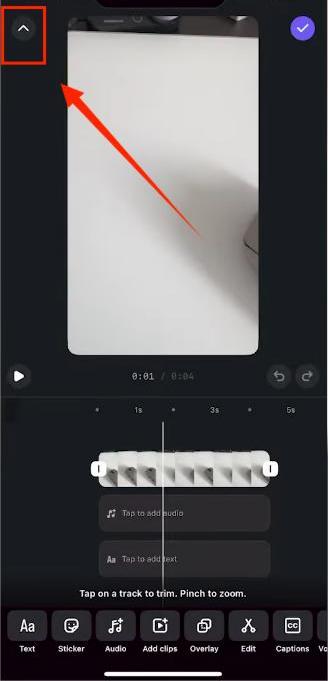
- Once you enter Instagram’s built-in editing tools, tap the Arrow icon at the top-left corner.
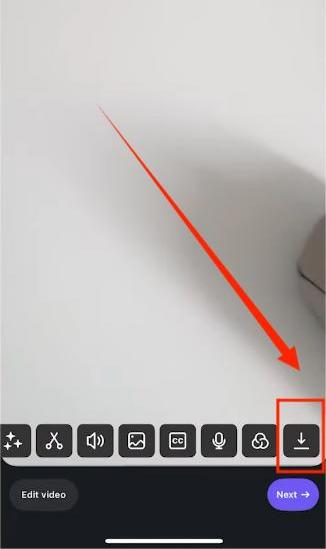
- Swipe to the right, and you will see a Download icon.
- After downloading your own Instagram reel with the original audio track on your phone, you can extract the audio from the saved video file using an editing app.
Method 2: How to Download Instagram Audio? [Screen Recording Feature]
This method is to use your phone’s built-in screen recording feature to capture the video that contains the audio you want to save.
⚠️ Note: The screen recording method described below is intended for personal use only. Please make sure you have the legal right to save or use the audio content, such as your own original recordings or content with proper permission. Always respect copyright laws and Instagram’s terms of service.
How to Download Instagram Audio With the Built-In Screen Recording?
- Simply start screen recording on your phone.
- Play the Instagram Reel, story, or video, and save the recording to your device.
- After that, send the recorded video to your computer.
- You can then use a video editing software to extract the audio track from the video file.
 Bonus Tip: Also want to download songs from Spotify, Apple Music, Amazon Music, and more platforms? Try this All-in-One Music Converter, which lets you download any track at up to 10X faster speed while preserving high audio quality.
Method 3: Save Instagram Audio with FlixiCam StreamOne for Personal Use
If you need to back up your own original audio or capture non-copyrighted content for offline listening, FlixiCam StreamOne can be a practical solution. FlixiCam StreamOne supports capturing and saving Instagram audio in high quality, allowing you to export the file in MP3 format for convenient playback. In addition to audio, it can also capture Instagram videos and save them as MP4 files.
With its built-in browser, FlixiCam StreamOne enables you to complete the entire process within a single app—so you don’t need to switch between multiple apps or tools. This streamlined workflow makes it easier to manage your personal content backups efficiently and securely.
Main Features:
- Capture Instagram audio in MP3 format.
- Back up Instagram videos as MP4 files.
- Record videos in MP4 or MKV from 1000+ sites, including Netflix, Amazon Prime Video, Disney+, YouTube, Max, and more.
- Support downloading subtitles & audio tracks in multiple languages.
- 10X download speed for efficient saving.
Compatibility: Windows 10/11, macOS 11 or later.
⚠️ Note: This article is for informational purposes only. Users are responsible for ensuring that their usage complies with local laws and regulations.
How to Download Instagram Audio on PC or MacBook with FlixiCam StreamOne?
Step 1 Run FlixiCam StreamOne and Select the Target Website
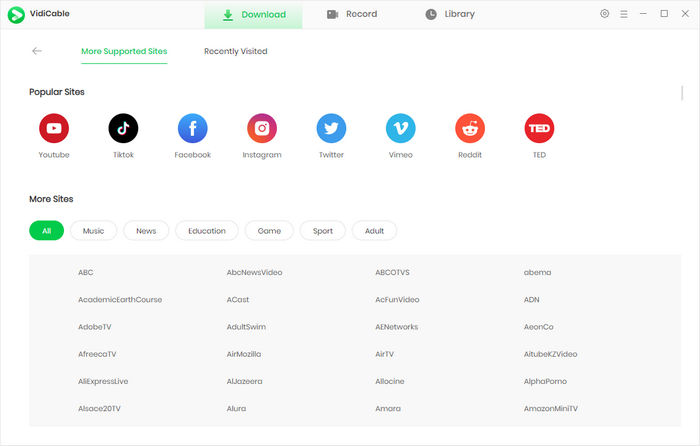
Launch FlixiCam StreamOne and navigate to the platform selection screen. Click “More Sites”, then choose Instagram from the list of supported services.
Step 2 Find the Video You Want to Save
In the built-in browser, find the Instagram reels or video you want to save.
Step 3 Customize the Output Settings
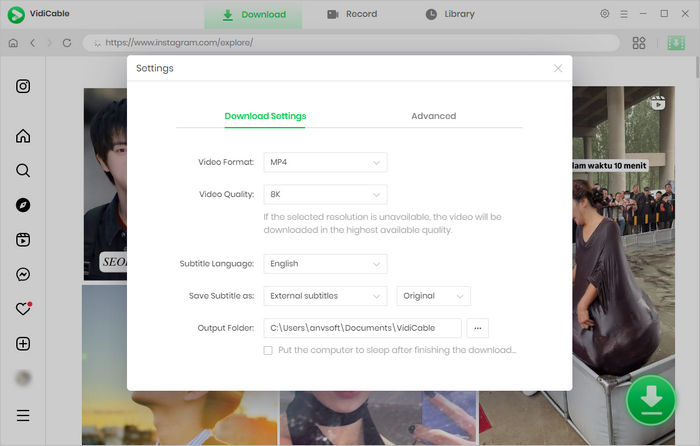
Before saving any content, click the Settings icon in the upper-right corner. From there, you can customize: output format (e.g., MP3 for audio or MP4 for video), output folder location, or quality preferences.
Step 4 Select Audio Track You Want to Download
Once you’ve opened the content, click the Download button to begin processing. Here you can select “Download as Audio”. You can then choose the format that best suits your needs—either MP3 for broader compatibility or Original Audio to preserve the source quality.
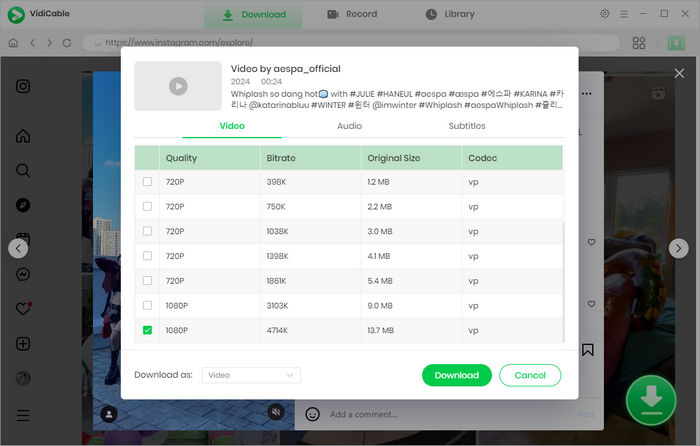
Step 5 Start to Download Instagram Audio
Click Download to download audio from Instagram. After the process is complete, all your audio becomes available for offline viewing with no expiration.
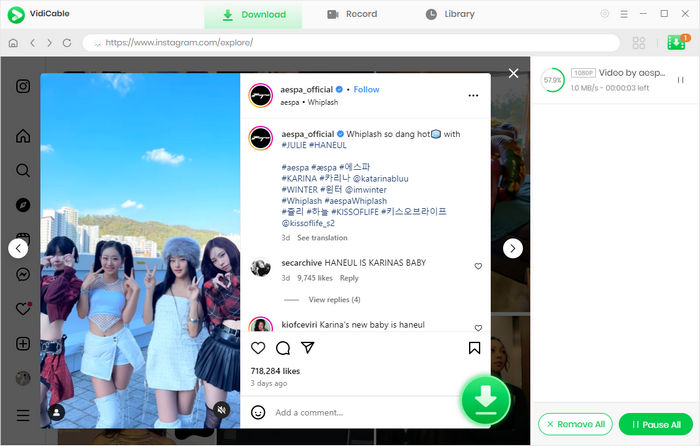
Method 4: How to Save Audio on Instagram for Future Use
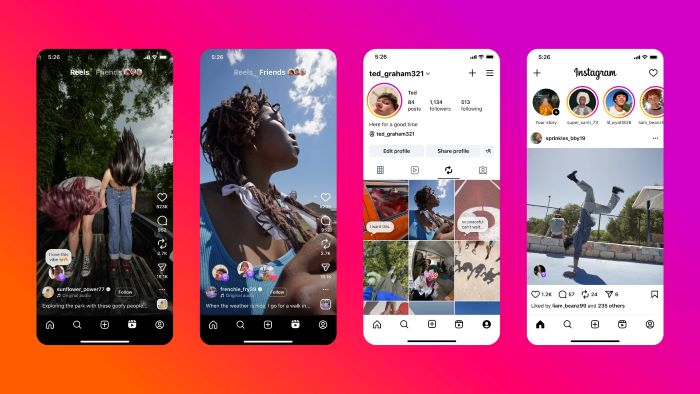
If you simply want to use a song or sound you discovered on Instagram to create your own Reel, there’s no need to download it externally. Instagram allows you to save audio directly within the app for future use.
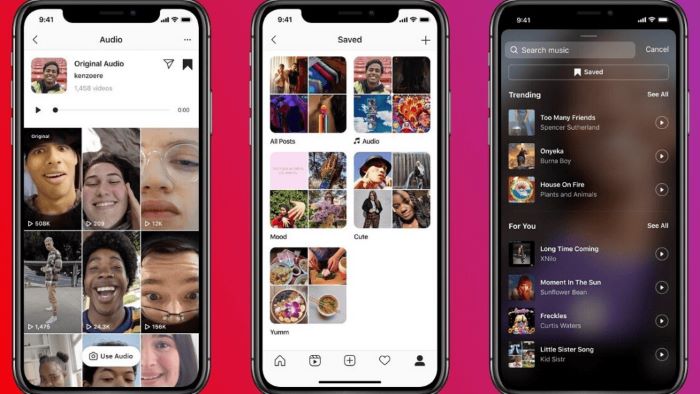
- Play a Reel or a video post, tap the audio name displayed on the screen. In Reels, it usually appears at the bottom; in posts, it may be shown beneath the username.
- Tap the audio icon will take you to the dedicated audio page. There, you can preview the sound and explore other Reels that use it.
- On the audio page, tap the Save icon (typically located in the top-right part). The audio track will then be added to your saved collection.
- Later, you can access it from the Saved section in the music library when you need to create your own Reel, Story, or post. This makes it easy to reuse the audio without downloading it externally or searching for it again.
FAQs about Downloading Instagram Audio
Why doesn’t Instagram allow audio downloads?
Instagram does not provide a direct audio download feature mainly due to copyright and licensing restrictions. Much of the music used in Reels, Stories, and posts comes from licensed agreements with record labels, artists, and music distributors. These agreements typically allow streaming within the app but do not permit standalone audio downloads.
Is it legal to download Instagram audio?
It depends on the ownership and usage rights of the content. In general, most music used in Instagram Reels, Stories, and posts is protected by copyright and licensed for in-app listening only. Downloading copyrighted audio without permission may violate intellectual property laws or Instagram’s terms of service. However, it is acceptable to download or save audio if:
- You are the original creator of the recording.
- The audio is royalty-free/public domain.
- You have the creator's express permission.
If ownership is unclear, we recommend using Instagram’s “Save” feature or reaching out to the creator for formal permission.
How do I download Instagram reels with audio?
For Your Own Content: You can download your Reel directly through Instagram’s built-in feature either before or after posting. This saves the video with its original audio to your device.
For Personal Backups: For content you own or have permission to use, downloader tools like FlixiCam StreamOne can capture a Reel in MP4 format. Note: Always ensure you have the legal right or explicit permission to store content externally to avoid copyright infringement.
How to download audio from Instagram?
If you need a standalone audio file, one option is to use your device’s built-in screen recording feature to record the video that contains the sound. Afterward, you can use standard editing software to extract the audio track as a separate file.
For a more convenient approach, some tools such as FlixiCam StreamOne provide a built-in browser that allows you to browse Instagram and save eligible Reels or post audio as MP3 files. This can simplify the process if you’re looking to back up content efficiently.
However, this method should only be used when you have the legal right to save the audio—such as your own original recordings, non-copyrighted content, or audio used with the creator’s permission. Always respect copyright laws and platform policies before downloading or storing any content.
How do I access saved audio on Instagram?
You can share saved audio via Instagram Direct Message. Follow these steps:
- Access your Saves: Go to your profile, tap the menu (three lines), and select Saved Audio.
- Select the Track: Tap the specific audio you wish to share.
- Send via DM: Tap the Share (paper plane) icon.
Final Words:
By now, you should have a clear understanding of how to download Instagram audio safely and responsibly. As discussed, there are four practical methods available, each designed to meet different needs. You can download your own Reel drafts using Instagram’s built-in save feature, record videos with your device’s screen recording tool and extract the audio track using editing software, or use a trusted third-party solution such as the FlixiCam StreamOne Instagram downloader to save eligible audio as MP3 files.
In addition to audio, FlixiCam StreamOne also allows you to save Instagram Reels, Stories, and posts as MP4 files for offline viewing. No matter which method you choose, always ensure that you have the appropriate rights to download or back up the content in order to stay compliant with copyright laws and platform policies.
Tessa Kirkland | Senior Writer