DOWNLOAD Win
 DOWNLOAD Mac
How to Download MKV Movies in HD Quality [Free Movie Websites in 2026]
 Tessa Kirkland
- 4 February, 2026
- Blog
MKV is a versatile video format that can store multiple audio, video, and subtitle tracks within a single file. Unlike traditional formats, MKV is designed for flexibility and scalability, making it ideal for preserving high-quality movies and TV shows without sacrificing compatibility. In this article, you’ll learn what MKV is, why it’s better than MP4, and the key advantages of using it.
We’ll also explore 11 proven ways to download MKV movies, including desktop software, online download sites, and other tools, along with a detailed comparison of their features. By the end, you’ll know exactly which method works best for your needs. Keep reading to find the easiest way to download MKV movies safely and efficiently!
⚠️ Disclaimer: This content is provided for personal and educational use only. Please ensure that you have a valid subscription to the relevant streaming platforms before accessing or using any content. We do not promote piracy or unauthorized distribution. All content remains the property of its respective copyright holders, and we strongly encourage readers to respect the rights of content creators.
What is MKV?
MKV, short for Matroska Video, is a type of video file format. The format was first released in 2002 and is completely open-source and free, which has helped it gain popularity among digital media enthusiasts.
Instead of being a video compressor like H.264 or H.265, MKV works as a container. Think of it like a box that can hold many things inside—video, audio, subtitles, and other information—all in one single file.
🚀Looking for a useful tool to download MKV and MP4 movies from multiple websites? This All-In-One Movie Downloader is your best choice!
Why choose MKV?
If you want maximum quality, flexibility, and rich features for movies and TV shows, you can choose MKV instead of MP4 or other formats.
- ✅Supports Multiple Audio and Subtitles: MKV files can include several audio tracks (e.g., English, Japanese, Spanish) and multiple subtitle options (hard or soft subs), all in one file.
- ✅High-Quality Video and Audio: MKV can store lossless video and audio, preserving the original quality without forced compression. It’s often used for Blu-ray rips, 4K, and high-bitrate movies.
- ✅Advanced Features: MKV supports chapters, menus, cover art, and metadata, making it great for organizing long movies or TV series.
- ✅Flexible and Open-Source: Unlike MP4, MKV is open and free, with no licensing restrictions. It works with many modern players like VLC, MPC-HC, and Kodi.
MKV vs MP4: Which Video Format Should You Choose?
| Feature | MKV (Matroska Video) | MP4 |
|---|---|---|
| Audio Tracks | Supports multiple audio tracks | Limited to fewer tracks |
| Subtitles | Supports multiple subtitle files, including ASS/SSA with styling | Basic subtitle formats only |
| Video & Audio Quality | Can store lossless video and audio without re-encoding | Focused on compression; may lose quality |
| Advanced Features | Chapters, menus, rich metadata, attachments (e.g., fonts) | Limited advanced features |
| Compatibility | Open-source, supported by modern players like VLC, Kodi | Universally playable on most devices, especially older ones |
| Best Use | High-quality movies, anime, multilingual content, advanced features | Maximum device compatibility and easy sharing |
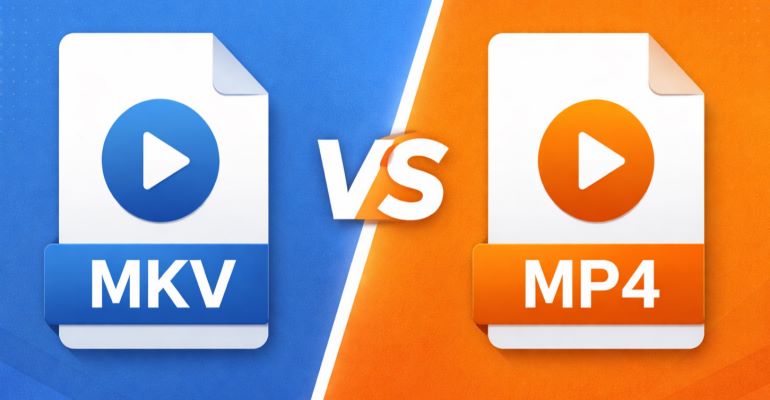
MKV vs MP4: What’s the Difference and Which Format Is Better?
MKV vs MP4: Which format is better? Compare video quality, file size, and device compatibility to find which format works best for your needs.
How to Download MKV Movies in HD Quality? [Step-by-Step]🔥
⚠️ Note: We do not promote piracy, cracking, or distribution of copyrighted content. This tool is only for personal use.
Are you looking for a way to download MKV movies from any website but struggling to find the right tool? A reliable and efficient MKV movie downloader FlixiCam StreamOne supports downloading from 1,000+ websites in MKV and MP4 format, including movies and TV shows in up to 8K quality.
With FlixiCam StreamOne, you can easily download MKV movies from popular platforms like Netflix, Amazon Prime Video, Disney+, HBO Max, Hulu, YouTube, Instagram, Twitter, and more, all without needing to install their official apps. FlixiCam StreamOne lets you pick from a range of resolutions to suit your preferences, with the option to choose different audio and video tracks as well. FlixiCam StreamOne also offers a batch-download mode for you to save multiple TV episodes or movies at one time. In addition, its ad removal feature guarantees a smooth, distraction-free viewing experience.
Why Choose FlixiCam StreamOne?
- Support MKV movies download in up to 8K.
- Keep 5.1 Dolby surround audio and SRT/VTT subtitles.
- Support 1000+ sites, including Amazon Prime Video, Disney+, YouTube, Hulu, Max, and more.
- Download subtitles & audio tracks in multiple languages.
- 10X download speed for efficient saving.
- Download multiple TV series at a time.
Compatibility: Windows 10/11, macOS 11 or later.
How to Download MKV Movies with FlixiCam StreamOne?
Step 1 Run FlixiCam StreamOne and Select the Target Website
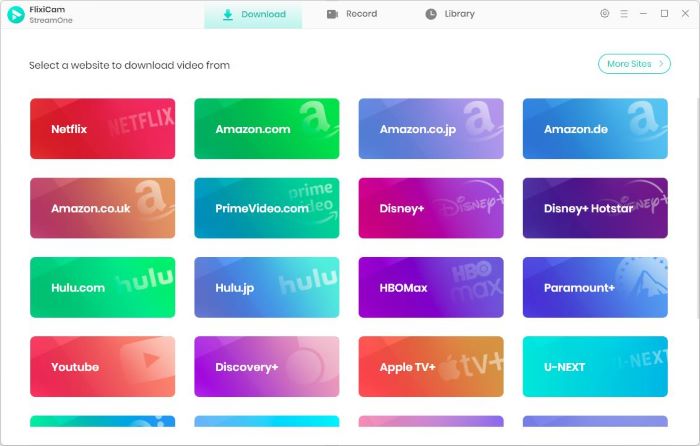
Get FlixiCam StreamOne for free on your Windows or Mac computer. After launching FlixiCam StreamOne, click the “Switch Website” button near the address bar and choose the website you want to download movies from.
Step 2 Find the Movie You Want to Download
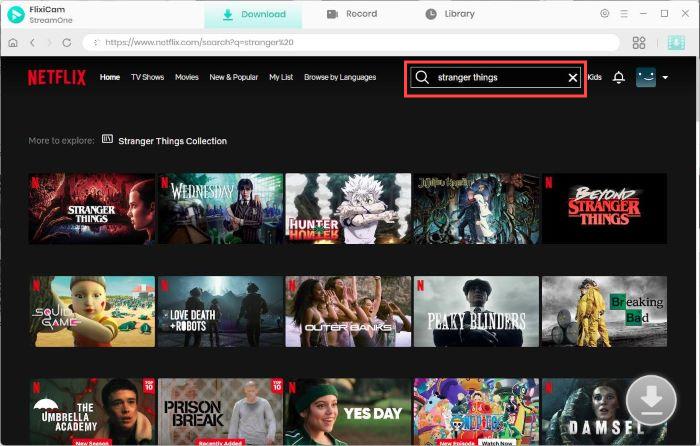
Use FlixiCam StreamOne’s built-in browser to browse the movie you want to save. From there, search for the movie or TV show, just as you normally would in a web browser.
Step 3 Customize the Output Settings
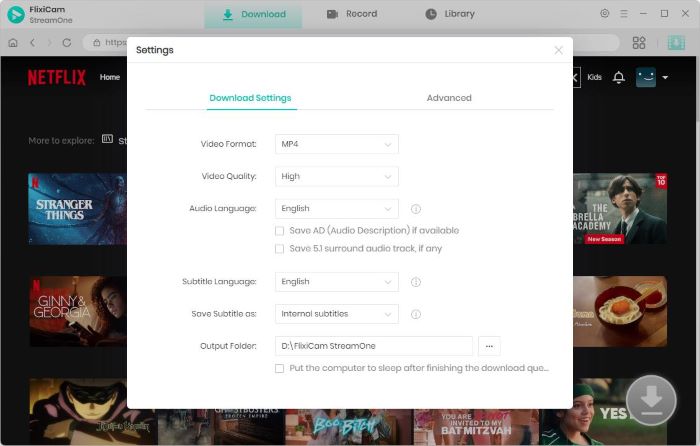
Click the Settings (gear-shaped icon) to adjust output settings. You can choose video format as MKV, customize video quality, set the download folder, choose your preferred audio language, subtitle options (SRT/VTT), and more.
Step 4 Select Audio Track and Subtitle
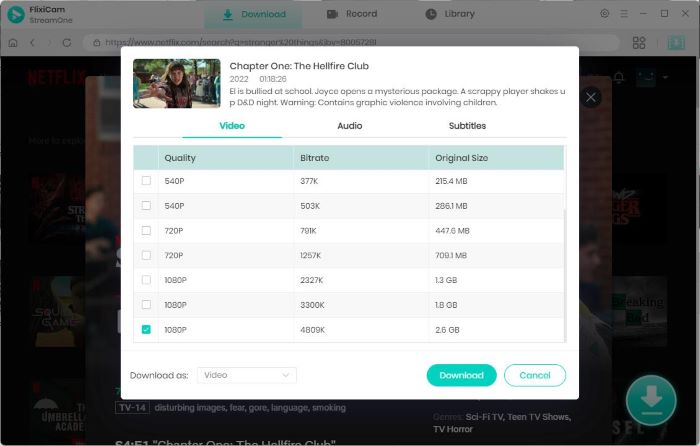
Play the movie you want to download, then hit the Download button. A pop-up will appear where you can pick the audio track and subtitle language you’d like to include.
Step 5 Start to Download Videos
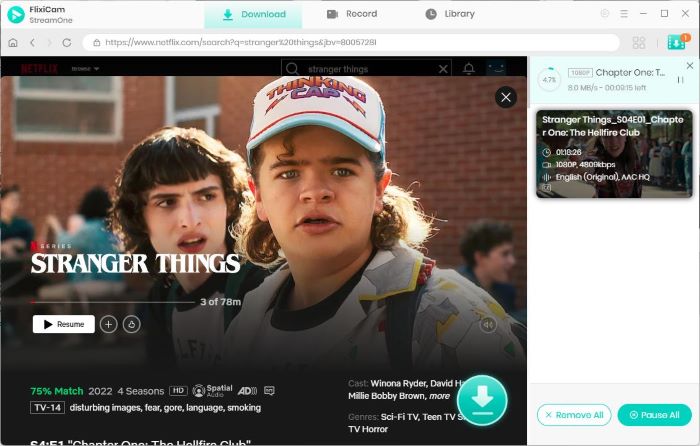
Click Download again to begin. FlixiCam StreamOne supports batch downloads, so you can keep browsing and add more videos to the queue. All downloaded files will appear in the Library tab, ready for you to watch offline anytime.
Need any support from FlixiCam StreamOne? Check FlixiCam StreamOne Support Center

How to Download Movie Clips - Free, Safe & Legal Methods
Learn how to download movie clips easily in this article - with a free and legal movie sense recorder for YouTube, TikTok, and more sites.
Top 10 Free MKV Movies Download Sites for Bollywood Movies
If you’re looking for an easier way to download Bollywood movies in MKV, MKV movie download sites might be exactly what you need. These platforms allow you to download movies online in MKV format. However, keep in mind that safety can be a concern when using such sites, as many of them come with pop-up ads or potential malware risks.
- Zee5: An official streaming platform known for strong regional content, offering high-quality, ad-free viewing with a premium plan and offline downloads on Android and iOS.
- SonyLiv: Sony Pictures Networks India’s official service featuring movies, TV shows, and live sports, with offline downloads available for subscribers.
- AllMoviesHub: A free movie site providing Bollywood, regional films, and international titles in Hindi, Punjabi, Marathi, Tamil, Telugu, Malayalam, and English.
- MkvMoviesPoint: Offers movies across multiple genres and languages, including Bollywood, Hollywood, South Indian cinema, and dubbed versions.
- Khatrimaza: A popular site featuring movies in 480p, 720p, and 1080p resolutions, available in MKV and MP4 formats.
- HDMovie2: Provides Bollywood, Hollywood, regional movies, and cartoons without requiring sign-ups.
- HD MP4 Mainia: A free platform offering a wide range of Bollywood MKV movies, though some links or subtitles may vary in quality.
- Bollyflix: A website and Android app offering Bollywood and regional movies in MKV and MP4 formats, with multiple resolutions and dual-audio support.
- ProtonMovies: Provides direct download links for lightweight 300MB MKV movies, with quality options from 480p up to 4K.
- VegaMovies: A free HD streaming site with no sign-up required, but no official download option and potential legal and safety risks.
⚠️ Disclaimer: This article is for informational purposes only and does not endorse or promote the use of illegal streaming websites. We fully support copyright protection and encourage all users to watch movies and TV shows through official, legal platforms.
To download MKV movies with ease, try FlixiCam StreamOne, which lets you save shows and movies in both MP4 and MKV formats.
FlixiCam StreamOne vs Free MKV Download Sites: Which is Better?
| Method | Supported Quality | Formats | Supported Sites | Safety | Compatibility | Extra Features | Best For |
|---|---|---|---|---|---|---|---|
| FlixiCam StreamOne 🏆 | 1080p, 2K, 4K, up to 8K | MKV, MP4, OPUS, M4A | 1000+ platforms (Netflix, Amazon Prime, Disney+, Hulu, YouTube, etc.) | ✅ 100% Safe (official software, DRM removal) | Windows & macOS | Batch download, ad removal, multi-language audio & subtitles, 5.1 Dolby | Users who want secure, high-quality, multi-platform downloads |
| MKV Movies Download Sites | 480p, 720p, 1080p (some offer 4K) | MKV, MP4 (varies by site) | Unofficial sites | ⚠️ Risky (pop-ups, malware, piracy issues) | Browser-based, no software required | Free downloads, multiple languages, Bollywood focus | Casual users looking for free Bollywood or regional movies in MKV |
FAQs about MKV Movies
Are free movies downloads illegal?
Yes, in most cases, downloading movies for free from unauthorized websites is illegal. These sites often host copyrighted content without permission, which violates copyright laws. Using such sources can lead to legal consequences, malware risks, or compromised personal data. For a better viewing experience, we recommend using an ad blocker when using these websites.
Is it safe to download MKV files?
Downloading MKV files can be safe if you use legal and trusted sources, but it can be risky from unauthorized websites. To download MKV movies from legal websites such as Netflix, Amazon Prime, Disney+, and more, FlixiCam StreamOne is the best solution as it is a 100% safe and ad-free downloader.
How to download MKV movies in iPhone?
Unfortunately, iPhones don’t natively support MKV files, so you’ll need a compatible video player app like VLC, Infuse, or PlayerXtreme to play MKV movies. Here is the process to play MKV movies in an iPhone.
- Use FlixiCam StreamOne to save the MKV movie directly within the app.
- After the MKV movie is downloaded on your computer, transfer it to your iPhone using iTunes, Finder (Mac), or a file-sharing app.
- Open the MKV file in your chosen video player app, such as VLC, Infuse, or PlayerXtreme.
Final Words:
If you want to download MKV movies for offline watching, you can either use online MKV download sites or a professional MKV movie downloader like FlixiCam StreamOne. It is easy and quick to use online MKV movie download sites, but keep in mind that these tools often change domains and may expose your device to risks such as pop-up ads or hidden malware—so proceed with caution.
The more reliable option is to use a dedicated MKV movie downloader like FlixiCam StreamOne. Supporting 1,000+ legal streaming platforms, FlixiCam StreamOne lets you download movies and shows in MKV format safely, with permanent offline access and high-quality playback. Ready to start downloading your favorite movies and shows in MKV or MP4 format? Try FlixiCam StreamOne today with a free trial.
Tessa Kirkland | Senior Writer