DOWNLOAD Win
 DOWNLOAD Mac
MKV vs MP4: What’s the Difference and Which Format Is Better?
 Tessa Kirkland
- 31 March, 2026
- Blog
MKV vs MP4: which is better? Many users face this question when downloading, storing, or sharing videos. Both formats are widely used, but they serve different purposes.
In this guide, we’ll compare them in terms of video quality, file size, compatibility, subtitles, and streaming support. We’ll also explore different use cases such as offline viewing, media storage, and video editing to help you decide which format best fits your needs.
1. What Is MKV?
MKV (Matroska Video) is an open-source, "all-in-one" multimedia container. It is best known for its incredible flexibility—it can house an unlimited number of video, audio, and subtitle tracks within a single file. It supports multiple audio tracks and subtitle streams, making it popular for HD movies and TV shows while maintaining high video quality and compatibility with many media players.

2. What Is MP4?
MP4 (MPEG-4 Part 14) is the world’s most compatible video format. It is designed to deliver a balance between high visual quality and efficient file compression, making it much smaller than a typical MKV file. Because of its high compatibility, MP4 is commonly used for streaming, sharing, and playing videos on most devices.
3. MKV vs MP4: Key Features Compared
In this MKV vs MP4 comparison section, we’ll take a closer look at the main differences between the two formats, such as video quality, file size, audio formats, and subtitle support.
File Size
MKV files are usually larger because they can store multiple audio tracks, subtitle files, and detailed metadata in a single container. This makes MKV ideal for high-quality video collections. MP4 files are generally smaller and more compressed, which makes them easier to store, upload, and share online.
Video Quality
Both MKV and MP4 can support high-quality video, including 1080p and 4K. The actual video quality of MKV or MP4 file mainly depends on the codec used (such as H.264 or H.265), not the container format itself. However, MKV is often preferred for preserving original video quality in movies and Blu-ray rips.
Compatibility
MP4 is one of the most universally supported video formats, making it highly compatible with almost all mainstream devices. MKV, while a flexible and high-quality container, has more limited native support.
| Device / Platform | MP4 | MKV |
|---|---|---|
| iPhone & iPad | Fully supported natively | Requires third-party apps or conversion |
| Android | Playable on most devices | May require third-party apps |
| Mac | Works with native apps | Needs third-party players |
| Windows PC | Playable on most software | Supported by modern players; default may need codecs |
| Smart TV | Most modern TVs support it | Newer TVs may support, older need conversion |
| Game Console | Playable on PS, Xbox, Nintendo Switch | Generally not supported |
| Web Browser | Playable on all major browsers | Not supported natively |
Subtitle Compatibility
MKV has stronger subtitle support because it can include multiple subtitle tracks in different languages within the same file. This makes it popular for movies and anime. MP4 can also support subtitles, but the options are usually more limited.
Audio Compatibility
Both MP4 and MKV support multiple audio formats, but their compatibility differs depending on devices and media players.
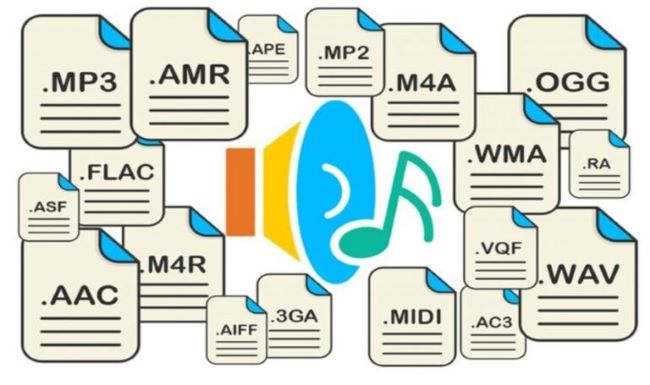
MP4 commonly supports audio codecs such as AAC, MP3, and ALAC. Their broad support across smartphones and web browsers makes MP4 a dependable format for online video distribution.
MKV offers more flexibility and can support a wider range of audio codecs, including AAC, MP3, AC3, DTS, and FLAC. This makes MKV popular for high-quality movie releases that include advanced surround sound formats. However, some devices or media players may not support these audio formats without additional codecs.
Streaming Support
MP4 is better optimized for online streaming and web playback. Many streaming platforms and websites prefer MP4 because it loads quickly and is compatible with HTML5 video players. MKV is less commonly used for streaming and is more often used for offline viewing and video archiving.
How to Download MKV Movies in HD Quality [Free Movie Websites in 2026]
Looking to download MKV movies for offline viewing? Discover trusted MKV movie downloaders, including desktop apps and online sites.
Codec Compatibility
MP4 commonly uses widely supported codecs such as H.264 (AVC) and H.265 (HEVC). Because these codecs are standardized and optimized for streaming, MP4 files can be played on almost all devices and platforms without compatibility issues.
Although MKV supports a wider range of codecs such as H.264, H.265, VP9, and AV1, some devices and default media players may not fully support them, while MP4 remains widely compatible due to its standardized codecs.
Metadata Handling
Metadata refers to additional information stored in a video file, such as title, chapters, subtitles, audio tracks, and language settings.
MKV stands out when it comes to metadata. Its capable of storing multiple audio tracks, several different subtitle streams, where the Chapter markers come in handy and its pretty much got all the tags you need in one file.
MP4 also does metadata, but it’s a bit more restrictive compared to MKV. MP4 files are typically designed for simpler media distribution and streaming rather than complex media packaging.
4. MKV vs MP4 for Different Uses
When it comes to three common scenarios: streaming, editing, and downloading videos—should you choose MP4 or MKV? In the following sections, we’ll explain the compatibility differences between MP4 and MKV in real-world situations, helping you decide which format best suits your needs.
Streaming
MP4 is usually the better choice for streaming. It is widely supported by web browsers, mobile devices, and popular platforms, which makes it ideal for online playback. Most common media players, such as VLC, Windows Media Player, and QuickTime, can open MP4 files without any additional codecs.

MKV, while capable of high quality, is not always supported by streaming services or browsers without additional players. However, it works well with advanced media players like VLC and Kodi, which fully support MKV files and their multiple audio tracks and subtitles. On some default players or browsers, MKV files may require extra codecs or a compatible player to stream properly.
Editing
For video editing, MP4 is often more convenient because most editing software supports it natively. Many editors work smoothly with MP4 files without requiring conversion. Popular editing programs such as Adobe Premiere Pro, Final Cut Pro, and DaVinci Resolve can import and edit MP4 files directly with stable performance.
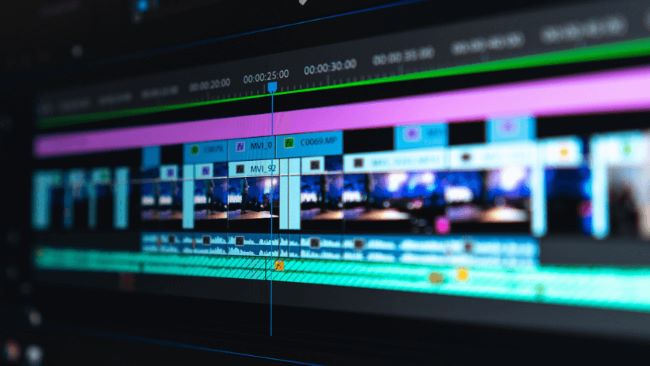
MKV files, on the other hand, are not always fully supported in professional editing software. Some editors may not recognize MKV files or may only partially support them. As a result, users often need to convert MKV to MP4 or another editing-friendly format before importing the footage into these editing tools.
Downloading and Archiving Videos
When downloading movies or TV shows, MKV is often preferred because it can store multiple audio tracks, subtitle streams, and chapters in a single file. Because of this, it is commonly used for high-quality movie files and multilingual media.
MKV is also a good choice for archiving videos. Its flexible container format supports multiple media tracks and high-quality video without major limitations, making it suitable for long-term storage or backups. However, if you need better compatibility with various devices and players, MP4 may still be the safer option.
5. How to Download MP4/MKV Videos from Any Site?
Both MP4 and MKV have their own advantages, making them suitable for different situations when choosing a video format. But how can you download videos in MP4 or MKV from the websites you’re interested in?
The process is simple. With FlixiCam StreamOne, you can easily download videos for offline viewing on your Windows PC or Mac. FlixiCam StreamOne supports 1000+ websites, so you can save videos from almost any platform you like, including major streaming services, live streaming platforms, and social media sites. This makes it easy to download and keep your favorite videos in MP4 or MKV format for convenient offline playback.
Main Features:
- Download videos in MP4 or MKV from 1000+ sites, including Netflix, Amazon Prime, Disney+, YouTube, Hulu, Max, Apple TV+, and more.
- Download TV shows and movies in up to 1080p.
- Support downloading subtitles & audio tracks in multiple languages.
- 10X download speed for efficient saving.
Compatibility: Windows 10/11, macOS 11 or later.
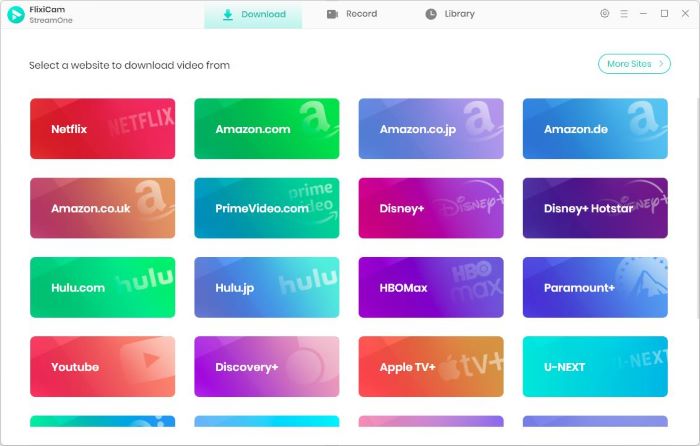
Step 1 Run FlixiCam StreamOne and Select the Target Website
Download and install FlixiCam StreamOne on your computer, then open the program. Click the “Switch Website” icon next to the address bar and choose the target website from the supported platforms.
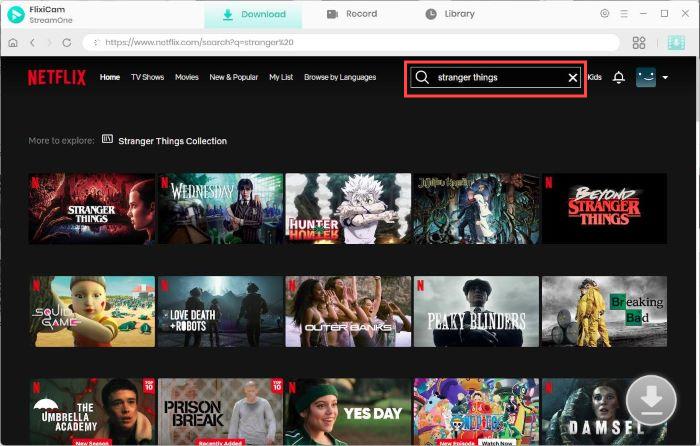
Step 2 Search for the Video
The program includes a built-in browser, allowing you to browse and watch content directly inside the software. Use the search bar to quickly find the movie or TV show you want to download..
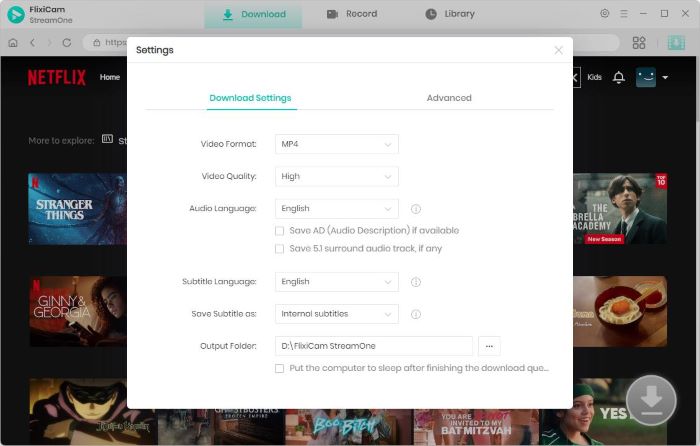
Step 3 Customize the Output Settings
Open the Settings window to customize your download preferences. Here you can select the video format (MP4 or MKV), set the output folder, and choose subtitle options or other parameters before starting the download.
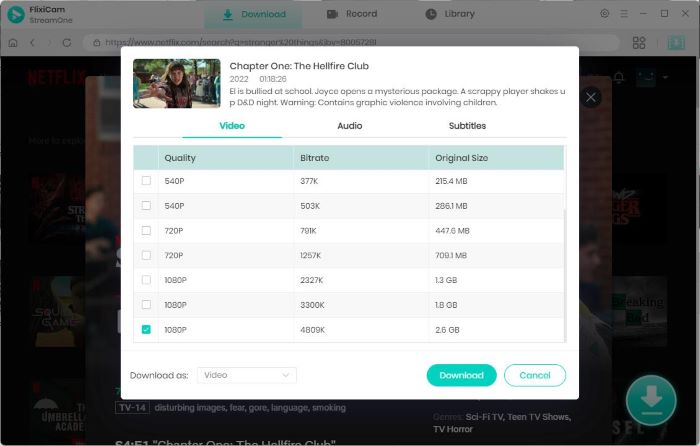
Step 4 Select Audio Track and Subtitle
Start playing the video and click the Download button. A detailed download panel will appear, where you can select your preferred video quality, audio track, and subtitle language based on your needs.
Step 5 Start to Download Videos
Click Download again to begin saving the video to your device. The progress and remaining time will be displayed in the sidebar. Once the process is complete, you can find all downloaded videos in the Library section for easy access and offline playback.
FAQs about MKV vs MP4
What is a better format, MKV or MP4?
There’s no one-size-fits-all answer. You should choose the right format based on your needs. If you prefer compatibility, streaming, and smaller file sizes, choose MP4. If you prefer high-quality videos, multiple audio tracks, and subtitles, choose MKV.
Is MP4 or MKV better for 4K?
Both MP4 and MKV support 4K video without reducing quality. MKV is often used for 4K movies because it can include multiple audio tracks and subtitles in one file, while MP4 offers better compatibility with most devices and media players.
Does MKV lose quality?
MKV itself does not lose quality. Video quality depends on the codec and compression used. MKV is often used to store high-quality videos with minimal or no compression, making it great for preserving originals.
Conclusion
Ultimately, whether you choose MKV or MP4 depends on the device you use and how you plan to use your videos. If you need a flexible solution, FlixiCam StreamOne allows you to download movies, TV shows, and even live streams and save them in MP4 or MKV format. This makes it easy to watch videos offline or use them for editing and other purposes. With support for both formats, FlixiCam StreamOne helps ensure your videos are compatible with different devices and viewing needs.

The Best Video Enhancer Tool
In pursuit of a better visual experience, you may want to watch videos with 4K or higher resolution. AVCLabs Video Enhancer AI is a great option for you to improve the video quality from HD (720p) to 1080p, or 4K, even up to 8K. With the assistance of AI technology, it can improve the quality of your footage with most of the details recovered. Learn More >>
Tessa Kirkland | Senior Writer