KeepVid Review & Alternative to Download Video to MP4/MP3 Safely
 Tessa Kirkland
- 27 January, 2026
- Blog
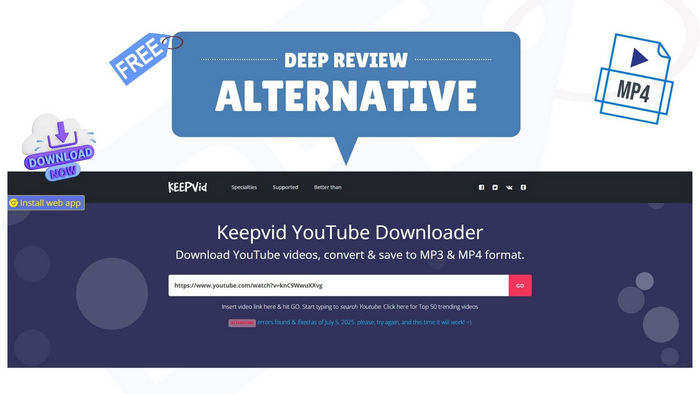
You must know that you can use KeepVid to download MP4 or MP3 music from YouTube online. The best part is you don't need to install any extra software or log into an account to start. Let's take a closer look at this free KeepVid video downloader and its safe alternative.
Part 1: KeepVid Overview
1.1 What Is KeepVid?
⚠️ Note: We do not promote piracy, cracking, or distribution of copyrighted content. Users are responsible for ensuring legal use of any content they access.
KeepVid is an old-school and web-based tool for saving online videos to MP4 or MP3 files, totally free. You can either add YouTube URLs or Instagram & Facebook links to it for pasting and converting.
After converting online videos to MP4 or MP3, you can enjoy them on any media player offline, with no buffering anymore.
Main Features of KeepVid:
- Save videos or audios from YouTube, Facebook, Instagram, etc.
- Download online video to MP4, WEBM, MHTML, MP3, and M4A.
- You just paste the video link and click download. It's easy to use.
💡 Pro Tips: If you want to save online videos not just from YouTube, Facebook, but also Netflix, Amazon Prime, or other streaming platforms, this All-In-One Video Downloader suits you well.
1.2 Pros and Cons of KeepVid
Pros
- Works on YouTube, Facebook, Instagram, etc.
- Free to download videos to MP4, or MP3 files.
- Support video quality at up to 4K.
- Works on phones, computers, and tablets.
- Simple to use and quick downloads.
Cons
- The server will be unstable sometimes.
- You will get pop-up redirect ads on every click on KeepVid site.
- Lack of most streaming video platforms.
- No batch downloads support.
Part 2: How to Use KeepVid to Download Online Video to MP4/MP3
The quick and free way is to use KeepVid online website (e.g., keepv.id). Its site can be unstable, so be sure you have an alternative method as always.
Step 1 Go to the video you want (on YouTube, TikTok, etc.) and copy the link from your browser's address bar.
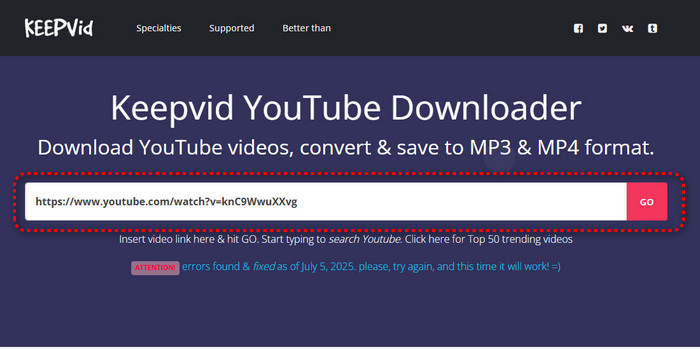
Step 2 Go to a KeepVid site. On the site's homepage, you’ll see a big box. Paste your video link there, then GO.
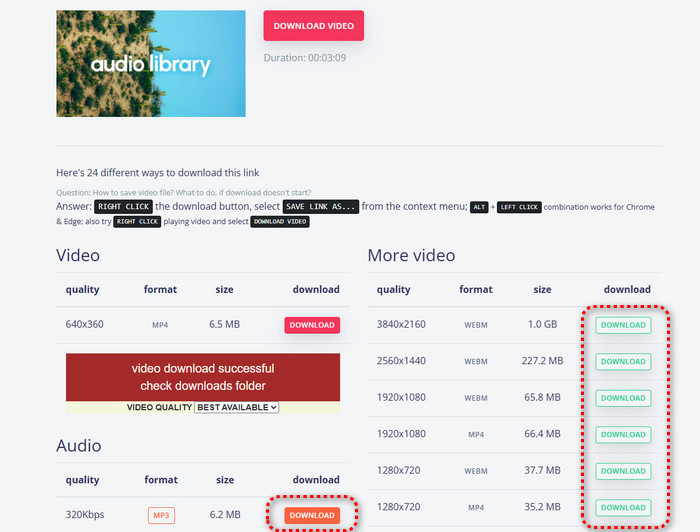
Step 3 For YouTube MP4 Video, find your preferred quality, then Download. For MP3 Audio, select your preferred format, and Download.
How to Download Netflix Movies on Laptop [4 Effective Methods]
Netflix officially removed the download feature from its laptop app, but don’t worry. In this guide, we’ll share 4 effective methods to download Netflix movies on a laptop.
Part 3: FAQs to Keepvid: Is It Legal & Safe?
3.1 Is KeepVid Safe?
Not totally. There are too many aggressive ads, pop-ups, and redirects on free KeepVid websites. Though the download itself might work, visiting these sites carries some risk. If you use KeepVid to download MP4 videos, it's suggested to use a good ad blocker as well.
3.2 Is KeepVid Video Downloader Legit?
KeepVid is a real program that can download videos. However, when you download videos, you have permission to save. In other words, it's better to download the copyright-free videos from YouTube, Facebook, or other platforms.
3.3 Can I Download 4K YouTube Video on KeepVid?
Yes. If your original video source supports 4K, KeepVid typically detects it as 3840×2160 resolution, it equals to 4K. If this doesn't work, you can try 4K Video Downloader freeware, one of its alternatives.
3.4 Can I Avoid Ads on KeepVid?
The ads are how KeepVid makes money. So KeepVid itself doesn't support to avoid ads. To do this, you can use a strong ad blocker to block most of them.
3.5 Does KeepVid Support Bilibili, Netflix, Twitter, Spotify, etc?
Not at all. Refer to its advertisement, KeepVid only supports YouTube, Facebook, Instagram and some other social platforms. After testing, KeepVid is not allowed to parse and download titles from Netflix, Spotify, or Bilibili.
To download Netflix, Bilibili, etc to watch offline on laptop, you can try this FlixiCam StreamOne Video One - save MP4 or MP3 from 1000+ sites.
 DOWNLOAD WIN
 DOWNLOAD MAC
Part 4: Test and Review on KeepVid
Here we have tested KeepVid's performance and show you its strengths and weaknesses.
| Result | Explanation | |
|---|---|---|
| Support Site | TikTok, Instagram, Facebook, etc | TikTok/Instagram/Facebook usually support; Bilibili hit-or-miss; Netflix/Spotify/encrypted platforms not support. |
| Download Speed | Fast, about 8 seconds a video. | Faster than old online tools. Depend on your internet. |
| Success Rate | 60 ~ 80% | It fails on age-restricted, copyrighted, live streams, or recently changed encodings. Some videos parse, but download fails midway. |
| Video Quality | Most in 1080P MP4 | Output SD to HD always. 4K is listed, but not all videos support. Rarely gets true 4K/8K. |
| Audio Quality | 192–320kbps MP3 | Extract MP3 audio from YouTube video, provides decent bitrate for music/podcasts. |
| Batch Download | Not Support | Doesn't support batch download. Need to download MP4 video one by one. |
| ID3 Tags Retain | Not Support | Doesn't save accurate ID3 tags. |
| Ads Interruption | High Risk | ⚠️ You will get pop-up ads on every click of the website. |
Conclusion: If you can sit with its ads or use an ad blocker, KeepVid is still a "usable" basic tool to download MP4 videos for free. And if you want to download more than Facebook or Twitter, it's strongly recommended to use alternatives for a better experience - All-In-One Video Downloader discussed below.

How to Download Movie Clips - Free, Safe & Legal Methods
Learn how to download movie clips easily in this article - with a free and legal movie sense recorder for YouTube, TikTok, and more sites.
Part 5: Best KeepVid Alternative - All-In-One Streaming Video Downloader
If you're tired of KeepVid's unstable download performance, endless ads, and lack of batch downloads, use FlixiCam StreamOne All-In-One to avoid all these problems.
It's a video downloader app for Windows or Mac computers, that supports downloading MP4 or MP3 from both free sites (like YouTube) and premium streaming services (like Netflix and Disney+).
Even more, this KeepVid's alternative video downloader allows to save videos in up to 8K or 4K with original audio quality, as well as multi-language subtitles. You can download and stream any streaming video offline, without limitations anymore.
Main Features:
- Download movies from unblocked movie sites in 1080p.
- Download videos in MP4 or MKV from 1000+ sites, including Netflix, Tubi, Viki, Amazon Prime Video, Disney+, Hulu, Max, and more.
- Support downloading subtitles & dubbing in multiple languages.
- 10X download speed for efficient saving.
Compatibility: Windows 10/11, macOS 11 or later.
How to Convert with All MP4 Video Downloader
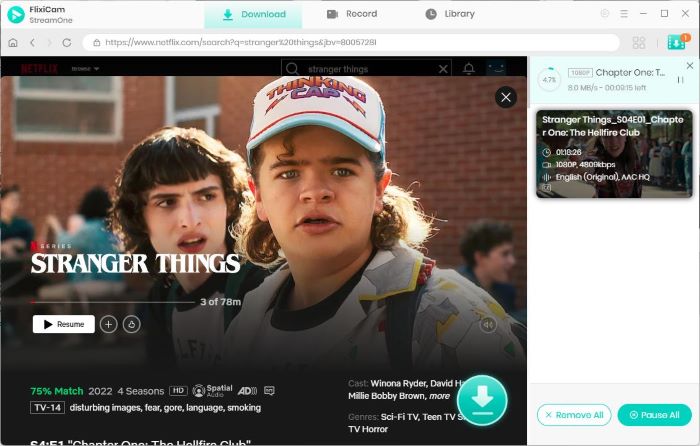
Step 1 Open this FlixiCam StreamOne MP4 downloader and enter your video URL to it.
Step 2 Click on the "Settings" button and choose MP4 output format, etc.
Step 3 Hit the "Download" button to convert any online video to MP4, at up to 8K.
Part 6: KeepVid vs FlixiCam StreamOne: Which is the Best MP4 Video Downloader?
| FlixiCam StreamOne MP4 Video Downloader | KeepVid MP4 Downloader Free | |
|---|---|---|
| Download Source | 👍 1000+ sites, including Netflix, Disney+, Amazon Prime, YouTube, TikTok, etc. | YouTube, Instagram, Facebook, etc. |
| Output Format | MP4 or MKV, MP3, AAC, etc. | MP4, MP3, WEBM, etc. |
| Output Quality | 👍 Up to 8K on YouTube; 1080p FHD on Netflix/Amazon Prime/etc. | Up to 1080p. |
| Download Speed | 10X faster | N/A |
| Batch Download | ✅ | ❌ |
| Success Rate | 👍 95%+ after tested. | 60-80% after tested. |
| Keep Meta Tags | ✅ Subtitles, multi-audio tracks, metadata saved. |
❌ No tag on MP4; Basic title/artist on MP3; |
| Ads-Free | ✅ | ❌ |
| Language Support | 26 languages | English |
| Price | Lifetime ~$149.9 (often discounted) | Free |
| Safe | ✅ | ⚠️ High Risk |
In general, if you have a strict $0 budge and only download single MP4 videos from social sites like YouTube/Tiktok, KeepVid free online tool works for you.
🏆 But if you prefer a clean & safe MP4 video downloader, especially if you want high-quality downloads from premium services (Netflix series/movies), FlixiCam StreamOne Video One is a better choice.
⚠️ Disclaimer: For personal/educational use only. 🚫 Do not distribute downloaded music/video for commercial use.
The End
KeepVid is a free and easy-to-use URL to MP4 downloader, it supports lots of social platforms. But it contains so many pop-up ads, and the video quality varies. For safer, high-quality, and batch video downloads, an All-In-One MP4 desktop downloader like FlixiCam StreamOne is the better long-term choice.
Tessa Kirkland | Senior Writer