 DOWNLOAD Win
 DOWNLOAD Mac
Download Disney+ Hotstar Videos on Windows PC (2026 Latest)
 Tessa Kirkland
- 30 February, 2026
- Blog
Disney+ and India's Hotstar have merged for a long time, but someone are still confused when trying to download Hotstar shows to watch offline on Windows computer. Does it support? Or any alternative? Here we will answer all in one article.
 You may also be interested in: How to Save Hotstar Video Download in Gallery: 5 Ways on PC, Mac & Mobile
Part 1. Can You Download Disney+ Hotstar App on Windows PC?
There's no native Disney+ Hotstar app for Windows/Mac computers. If you wanna download Hotstar movies or shows for offline playback, try this Disney+ Hotstar Video Downloader.
The fact is, till 2026, there's no official Disney+ Hotstar app made for Windows PC. So if you are in India, Indonesia, Malaysia, Thailand, or another supported region, you can only download Hotstar titles by using its mobile app on Android or iOS. While for a Windows computer, you can only visit Hotstar webpage and watch online.
Details on Disney+ Hotstar App
| Device Category | Hotstar Native App | Offline Downloads | Notes |
|---|---|---|---|
| Mobile Phones | ✅ | ✅ | Android 5.0+ iOS 12.0+ |
| Tablets | ✅ | ✅ | Android 5.0+ iOS 12.0+ |
| Smart TVs | ✅ (varies by model) |
❌ | 4K/Dolby Atmos on compatible hardware |
| Game Consoles | ❌ | ❌ | / |
Part 2. Best Way to Download Disney+ Hotstar Movies on PC
So you know that Disney+ Hotstar doesn’t offer an official download option for PC, you may need this DispCam Disney+ Hotstar Downloader.
DispCam is designed to download movies, shows, anime, and all videos from both Hotstar and Disney+ platforms. It's not just a video recorder, but a smart video downloader with an advanced transcription core, which allows downloading Disney+ Hotstar videos to MP4 or MKV plain format. You can save all Hotstar titles and watch them on any device easily.
Learn more about DispCam >>
Smartly download movies, TV shows or anime from Disney+ and Hotstar, so you can enjoy any videos offline at any time.
How to Download Disney+ Hotstar Videos on Windows PC
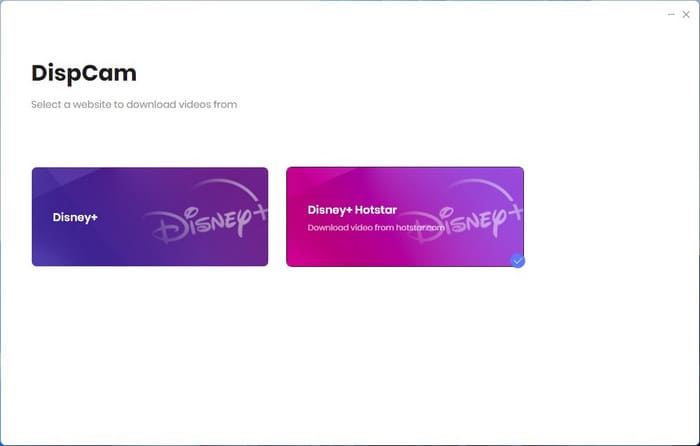
Step 1 Download and install DispCam Hotstar Video Downloader on your computer. Then you are going to choose Disney+ or Disney+ Hotstar platform to start. Choose the latter one.
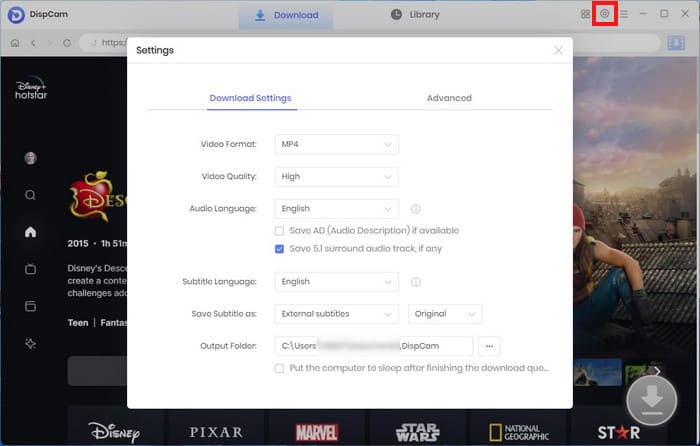
Step 2 Click the Settings icon in the top right corner. Here, you can choose your preferred video quality, format (MP4 or MKV), etc. Close the window to apply all features.
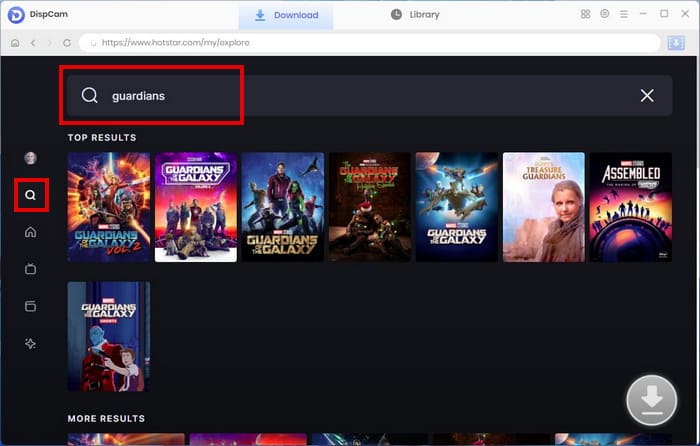
Step 3 Use the search bar to find Hotstar shows or movies by title. Or you can also paste a video URL directly.
Step 4 Click Download to save your selected Hotstar videos offline. If you have selected Hotstar episodes, DispCam will download them in batch.
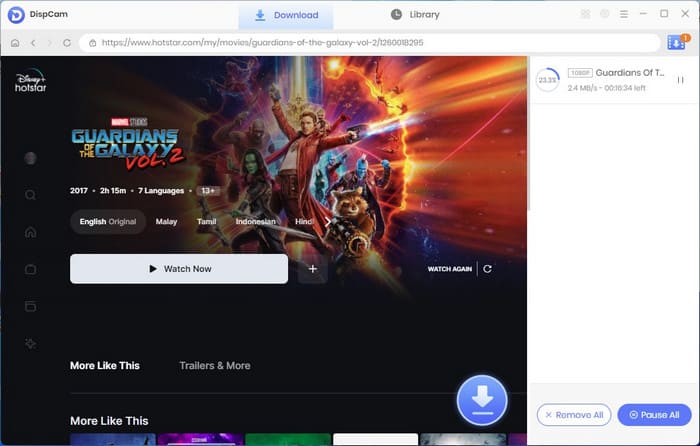
Once finished, your Hotstar videos are stored directly on your PC. You can now watch Disney+ Hotstar content offline, using any media player, without any time limits.

Everything You Should Know About Disney Plus Hotstar
This article provides a comprehensive overview of Disney+ Hotstar and introduces a Hotstar Video Downloader to help you download Hotstar videos on your PC.
Part 3. Use Android Emulator to Download JioHotstar for Offline Playback
In February 2025, Disney+ Hotstar and JioCinema merged, and now it is called JioHotstar, which offers movies, TV shows, live sports, and Disney+ originals. The bad news is, there's no Windows app for JioHotstar either.
Here's an alternative to use JioHotstar app on Windows computer - use an Android emulator to create a "virtual phone" inside your Windows PC, then you can stream offline Hotstar movies just like you are watching on mobile.
How to Use an Android Emulator to Download Hotstar App on Windows
You can use these popular and reliable emulators in 2026:
- BlueStacks - Easy for beginners
- LDPlayer - Lightweight and fast
- NoxPlayer - Great for multitasking
- MEmu Play - Smooth for streaming
The following will take BlueStacks emulator as an example to show you how to download Disney+ Hotstar app on your computer.
Step 1 Visit bluestacks.com and download the latest Windows version.
Step 2 Launch the BlueStacks emulator and sign in with a Google account.
Step 3 Install JioHotstar on Windows PC within BlueStacks emulator on your PC. It should stay on the Google Play Store.
Step 4 Open JioHotstar and sign in with your account. Now, you are able to download Hotsta series for offline playback.
FAQs to Disney+ Hotstar Downloads on PC
Q1: Does DispCam support batch downloading Hotstar movies?
Yes, DispCam fully supports downloading videos from Disney+ and Disney+ Hotstar (now JioHotstar in India) onto Windows or Mac computer. Just add multiple titles to the task, and it will download them at once.
Q2: When will Disney+ Hotstar launch an official desktop app?
Till now, there's no official Hotstar desktop app for Windows or Mac and no word of one coming in 2026 or later. You can only use a web browser, or alternatives - use DispCam Hotstar Video Downloader or Android Emulator to save Hotstar movies offline on PC for playback.
Q3: Can I watch Hotstar content inside the Disney+ app?
No, you can only watch Hotstar content within the JioHotstar platform. The Disney+ app doesn't include JioHotstar's library (live sports, regional Indian shows, etc.).
The End
Disney+ Hotstar (JioHotstar) doesn't provide an official desktop app. So if you wanna watch Hotstar on Windows, you can only visit its official webpage. Otherwise, you will need alternatives - DispCam Disney+ Hotstar Video Downloader or an Android Emulator.
Tessa Kirkland | Senior Writer