[2026 Latest] Download YouTube Videos Without Premium on Windows/Mac/iPhone/Chrome
 Tessa Kirkland
- 23 September, 2026
- YouTube Tips
Many of you want to download YouTube videos for offline playback, but don't want a YouTube Premium subscription. Or maybe you just want the YouTube titles saved as MP4s, instead of videos that disappear after a while inside the YouTube app.
Here's the good news: you will get simple instructions to download YouTube videos without Premium on Windows, Mac, iPhone, or Chrome in this guide. Just keep reading and get the one you need.
📢 Disclaimer: Please respect YouTube copyright - downloaded content is only for your personal offline use.
- ✅ Of course, you don't need to pay a monthly fee for offline viewing YouTube Premium content anymore.
- ✅ You won't have any buffering issues when travelling or getting a plane.
- ✅ You will get access to higher-quality options, like 4K or 8K.
- ✅ You can save your own collected YouTube videos without expiration.
- ✅ You can play actual MP4 YouTube files on your computer or phone easily.
If these benefits suit your needs, now try out the methods below to save your YouTube videos offline - no Premium account required!
Part 1. Download YouTube Video without premium Windows/Mac
1.1 With Flixicam YouTube Video Downloader (Best Overall Recommendation)
Flixicam is a powerful one-stop video downloader - it lets you download all YouTube videos, playlists, channels, audios and even movies offline in high quality up to 8K. Besides that, you can also extract subtitles or dubbed audio tracks from YouTube easily. All these features are totally free!
Not just YouTube videos, this Streaming Video Downloader tool also allows to record videos from TikTok, Vimeo, Facebook, Reddit, and many other social sites freely! You can now easily download any videos from all social platforms!
 DOWNLOAD WIN
 DOWNLOAD MAC
Guide to Free Download YouTube Video without Premium:
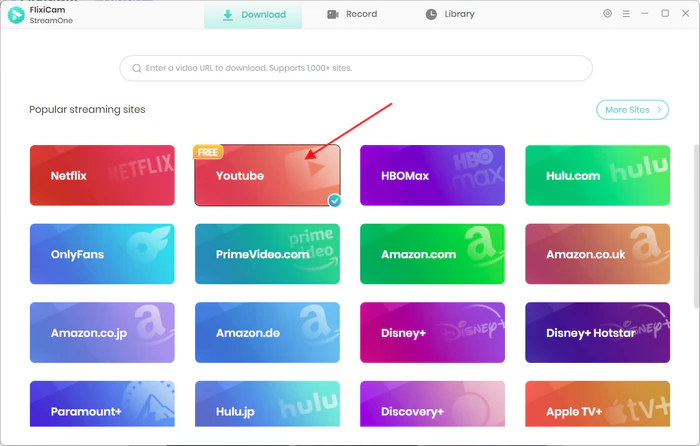
Step 1 Download Flixicam YouTube Video Downloader Free on your Windows or Mac computer. Also select "YouTube" as the download port.
Step 2 Log in to your YouTube Free account on the built-in browser.
Step 3 Go to Settings, choose MP4 as the output format for YouTube videos.
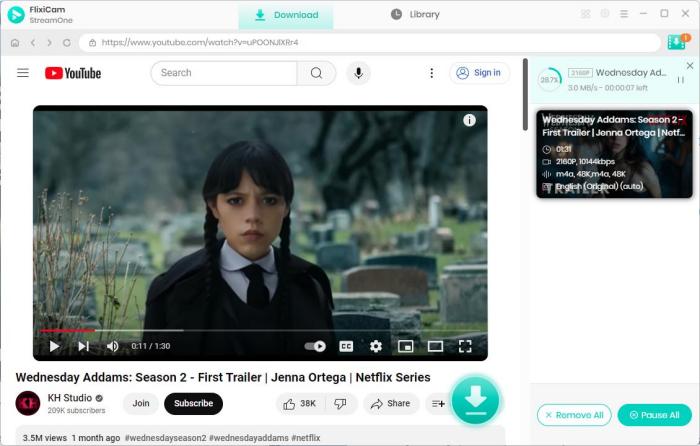
Step 4 Choose any YouTube title you want to download, and tap the Download icon at the bottom right. Choose the video, output quality, then start downloading.
Step 5 Go to Library to find out all downloaded YouTube videos, they are in MP4 format.
Pros
- Totally free to download videos from YouTube, FaceBook, Twitter, etc.
- Download any YouTube video, no Premium account required.
- Save YouTube video in up to 8K high-quality resolution.
- Download YouTube playlists in batches to save your time.
Cons
- Need payment if you want to download Netflix, Amazon Prime, or other streaming sites.
1.2 With 4K Video Downloader
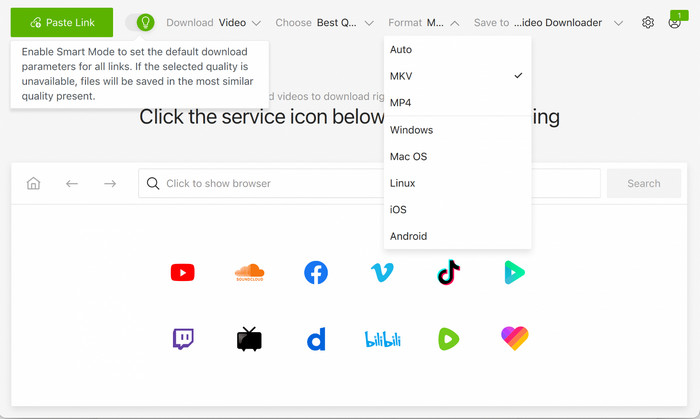
4K Video Downloader, also called 4K Video Downloader Plus, is a popular video downloader for Windows and macOS. It's also able to download YouTube videos to MP4, at over 4K resolution. You can set its smart mode to save all videos directly from YouTube's servers with just one click. Actually, you usually don't even need a YouTube account with this tool.
Simple Steps to Use 4K Video Downloader for YouTube (No Premium Required)
Step 1 Install 4K Video Downloader Plus.
Step 2 Open a YouTube video in your browser, and copy the URL.
Step 3 Go to this app, and paste the YouTube URL to it.
Step 4 Choose your preferred output quality, like 4K video quality for YouTube Free.
Step 5 Download.
Pros
- Download Free YouTube videos with excellent video quality - 4K & 1080P.
- It supports YouTube single videos or playlists.
Cons
- On trial, you can download around 10 videos per day, up to 10 videos per playlist, and 5 per channel.
- Subtitles and some advanced features required payment.
KeepVid Review & Alternative to Download Video to MP4/MP3 Safely
Is KeepVid good? Is it safe? Read this article, and you will get a detailed review on it, as well as an excellent alternative.
Part 2. Download YouTube Video without Premium on iPhone
Can I download YouTube video on iPhone without a Premium membership? The answer is no. It's tricky to install any YouTube video recorder app on iPhone, because of the restrictions on App Store, as well as saving videos from YouTube Free account.
Alternative Method 1:
You can use the online browser-based YouTube Download sites in iPhone's Safari, then just paste your YouTube link to it, and download. These sites usually don't require a YouTube Premium account - Y2Mate, SaveFrom, and more. Just note that they can only download videos in limited 360p or 720p; and there are too many ads popping up.

Best Free 10 YouTube Downloaders: How to Download Videos from YouTube
A guide to the top 10 free, safe and reliable YouTube downloaders, helping you easily download YouTube videos in MP4 or extract YouTube audio for offline viewing.
Alternative Method 2:
The best alternative method is to use Desktop YouTube Video Downloader app (Flixicam) to save content as MP4 files on computer, then transfer them to your iPhone via AirDrop, iCloud, or USB drive
DOWNLOAD WIN
DOWNLOAD MAC
Part 3. Download YouTube Video without Premium on Android
There are quite a few YouTube video downloader apps for Android. But you cannot download from Google Play Store, you need to download the APK from their websites manually. And again, all these YouTube Downloader Android APKs also don't require any Premium account.
YouTube Downloader for Android Phone
| YouTube Downloader APK | Output Format | Quality Support | No YouTube Premium Required | Ads-Free? | Cost |
|---|---|---|---|---|---|
| NewPipe | MP4, WebM, MP3 | Up to 1080p / 4K (varies) | ✅ | ✅ | Free |
| Seal | MP4, WebM, MP3, M4A | Up to 4K+ | ✅ | ✅ | Free |
| TubeMate | MP4, MP3 | Up to 4K | ✅ | ❌ | Free |
| Snaptube | MP4, MP3 | Up to 4K | ✅ | ❌ | Free |
| VidMate | MP4, MP3, M4A | Up to 4K | ✅ | ❌ | Free |
Part 4. Download YouTube videos without Premium on Chrome Extension
There are some extensions on Chrome that support saving YouTube videos offline. But the thing is that these YouTube downloader extensions can only download from third-party websites, instead of the Chrome Web Store. This is typically because of the Google Policy. Just be sure to choose the extension provider you trusted, for example:
YouTube Download Chrome Extensions - Working in 2026
| YouTube Downloader Chrome Extension | Output Format | Quality Support | YouTube Premium No Need | Ads-Free? | Cost |
|---|---|---|---|---|---|
| Addoncrop YouTube Downloader | MP4, WebM, MP3, AVI | Up to 4K | ✅ | ✅ | Free |
| SaveMate | MP4 | Up to 4K | ✅ | ✅ | Free (partial) |
FAQs to Download YouTube Videos
Q1. Can I download YouTube videos on Mac for free?
Of course. You can use Flixicam or 4K Video Downloader on your Mac. Just copy your video URL from YouTube Free account, select output format as MP4, then Download. Both these video downloaders are totally free to use.
Q2. How to download YouTube videos on PC without any app?
You can use online YouTube downloaders or YouTube downloader extension to capture video files. But most of these tools contain pop-up ads. Actually, a lightweight desktop app works better and safer, like the following Free YouTube Video Downloader.
Q3. Can I download YouTube videos on iPhone without an app?
You can use the browser-based YouTube downloader on your iPhone's browser to save YouTube content offline. These tools don't need installation, as always. However, you may be redirected to other sites when using them, which will be risky.
Q4. How do I download YouTube videos directly to my mobile gallery?
It's strongly suggested to download YouTube to MP4 on your computer using Flixicam, then transfer via cable, cloud, or AirDrop. This is the safest and easiest way to save all your videos on your YouTube playlists to your phone's gallery.
Final Word
This article discusses how to download YouTube videos without Premium across Windows, Mac, iPhone, Android, and Chrome. Just pick your desired tool and start saving your videos offline now!
Tessa Kirkland | Senior Writer
![7 Best YouTube Video Downloaders 4K for Free [100% Working in 2026]](/img/blog/youtube-4k-video-downloader.jpg)
