DOWNLOAD Win
 DOWNLOAD Mac
Can You Download Movies on HBO Max on a Laptop? [Step-by-Step Solution]
 Tessa Kirkland
- 29 January, 2026
- Blog
HBO Max offers an official download feature, but it comes with limitations. In this guide, we’ll explain what HBO Max does and doesn’t allow when it comes to downloads, helping you quickly check if your device and plan support offline viewing.
One of the most frequently asked questions by users is: Can you download movies on HBO Max on a laptop? While the official app doesn’t support laptop downloads, there is a reliable way to make it happen. In this guide, we provide a step-by-step method to download HBO Max movies on a laptop. Whether you’re traveling without Wi-Fi or just want to keep HBO Max movies forever, this guide has you covered.
- Can You Download Movies on HBO Max?
- Requirements to Download Movies on HBO Max (Official Rules Explained)
- Supported Devices for Offline Downloads
- Supported HBO Max Subscription Plans
- Limitations of Downloading HBO Max Movies via its Official App
- The Best Way to Download Movies on HBO Max on a Laptop 🏆 (Step-by-Step)
- FAQs about Downloading Movies on HBO Max on a Laptop
Can You Download Movies on HBO Max?
HBO Max does not allow movie downloads on laptops currently. However, you can still download HBO Max movies on a laptop by using a dedicated tool like FlixiCam StreamOne HBO Max downloader.
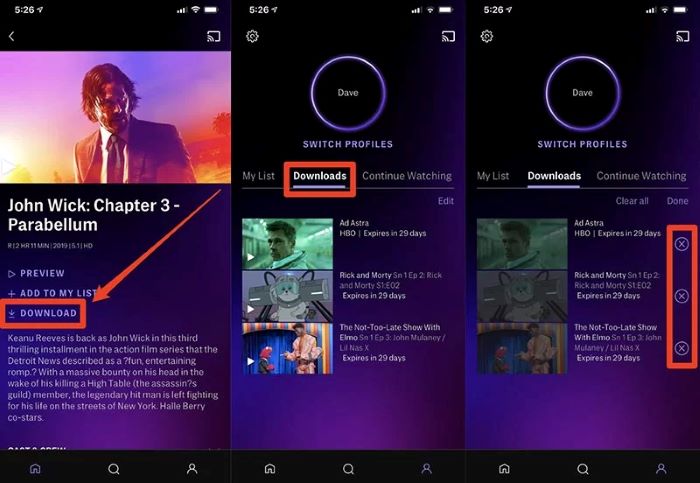
Yes, you can download movies on HBO Max, but the download feature is not available to all users. According to HBO Max’s official policy, the download feature on HBO Max is only available through the official app on certain devices, such as smartphones or tablets. There is currently no official way to download HBO Max movies on a Windows or Mac laptop.
Requirements to Download Movies on HBO Max (Official Rules Explained)
Supported Devices for Offline Downloads
Only the following devices allow you to download movies on HBO Max through the official app. Since HBO Max does not currently offer a downloadable app for laptops, downloading movies directly on a laptop is not supported.
- Most Android phones and tablets (with Android OS 5.1 or later)
- Apple iPhone, iPad, and iPod Touch (with iOS 15 or later)
- Amazon Fire tablets (4th generation or later)
For more detailed information, please go to the HBO Max official site.
Supported HBO Max Subscription Plans
The table below highlights which HBO Max plans let you download movies, along with their key features and restrictions. Take a look and see if your current plan allows you to download content for offline viewing.
| Feature | Basic with Ads | Standard | Premium |
|---|---|---|---|
| Price | $10.99/month | $18.49/month | $22.99/month |
| Video Quality | Full HD 1080p | Full HD 1080p | 4K Ultra HD (as available) |
| Offline Downloads | ❌ Not supported | ✅ Up to 30 downloads | ✅ Up to 100 downloads |
| Viewing Window | N/A | 48 hours after playback starts | 48 hours after playback starts |
| Download Expiration | N/A | Typically 30 days | Typically 30 days |
| Simultaneous Streams | Stream on 2 devices at once | Stream on 2 devices at once | Stream on 4 devices at once (2 for sports) |
Limitations of Downloading HBO Max Movies via its Official App
Although HBO Max allows you to download movies and TV shows for offline viewing, it imposes certain restrictions on downloads.
- Downloads are supported on Standard and Premium plans ✅; Basic with Ads is not supported ❌
- Only mobile devices can download HBO Max videos✅; Windows laptops and Macs are not supported ❌
- Downloads are stored in the HBO Max app ✅; saving to SD cards or other storage is not supported ❌
Not all titles in the HBO Max library are available for download, and some series even allow a maximum of 25 downloaded episodes per series.
For content that you haven’t started watching yet, downloads typically expire after 30 days. Once you begin watching a movie or show, you have 48 hours to finish it before the download expires.
Additionally, if a specific title is removed from HBO Max, any downloaded title will also become unavailable.
The Best Way to Download Movies on HBO Max on a Laptop
Since HBO Max does not offer an official way to download movies on laptops, using FlixiCam StreamOne HBO Max Video Downloader is the most effective alternative. It lets you download HBO Max movies and shows in MP4 or MKV, making it easy to enjoy offline playback on laptops, PCs, Macs, or any device you prefer.
Even better, FlixiCam StreamOne allows Basic with Ads users to download HBO Max movies, eliminating the need to upgrade to a Standard or Premium plan. It also automatically removes ads, so you can enjoy clean, ad-free playback when watching offline.
Key Features of FlixiCam StreamOne HBO Max Video Downloader:
- Download series and movies on HBO Max in HD quality.
- Enjoy fast download speeds with no limits on the number of downloads.
- Download videos in MP4 or MKV from 1000+ sites, including Amazon Prime Video, Netflix, Disney+, YouTube, Hulu, Max, and more.
- Support downloading subtitles & audio in many languages.
- 10X download speed for efficient saving.
Compatibility: Windows 10/11, macOS 11 or later.
Best for: Basic with Ads plan users, frequent travelers, and users who want permanent offline access.
How to Download HBO Max Movies Videos on a Laptop (Step-by-Step)
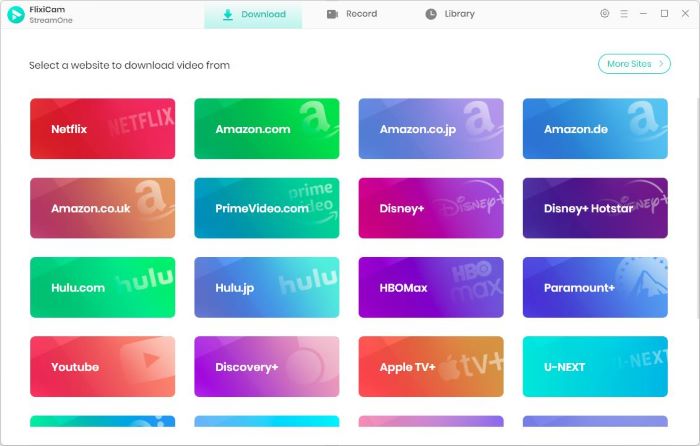
Step 1 Download and install FlixiCam StreamOne HBO Max video downloader on your laptop. Choose HBO Max to get started.
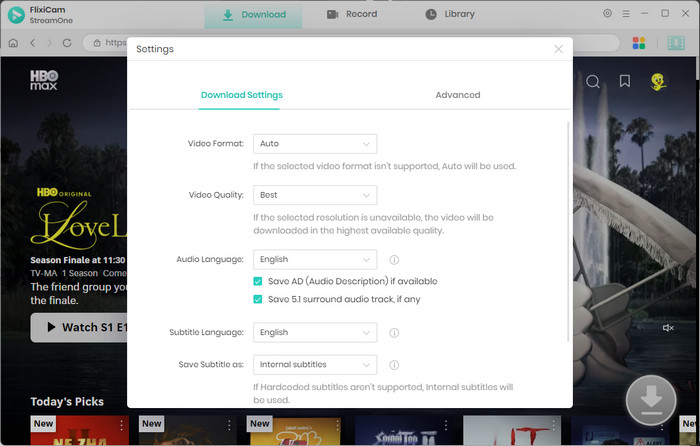
Step 2 Click the Settings icon in the top-right corner of the program. Here, you can choose your preferred video format (MP4/MKV), resolution, audio tracks, and subtitle options based on your needs.
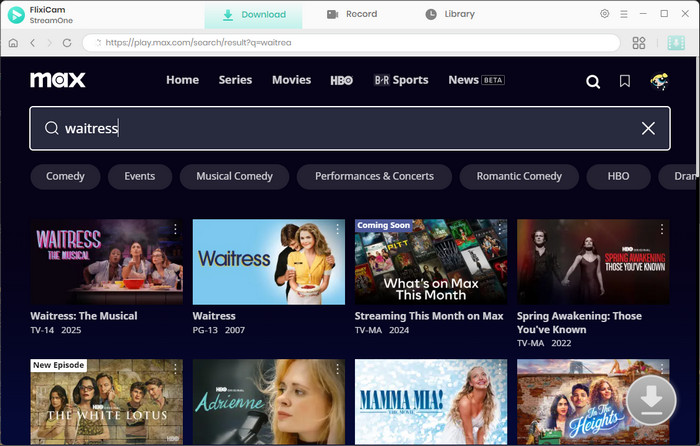
Step 3 FlixiCam StreamOne comes with a built-in HBO Max browser, allowing you to search and browse content directly within the app. Simply enter the title of the movie or TV show into the search bar.
Step 4 Once you open a title, the download icon at the bottom-right corner will turn green. You can also customize download options like video quality, audio language, and subtitles.
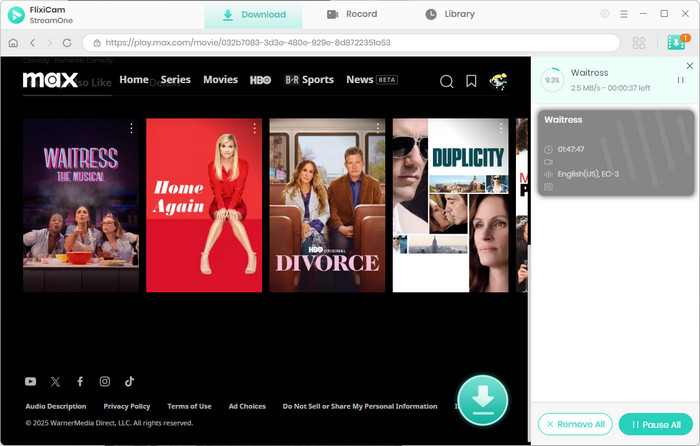
Once finished, your HBO Max movies or TV episodes will be downloaded in MP4 or MKV format and stored in the local storage.
HBO Max App vs FlixiCam StreamOne HBO Max Video Downloader
| Feature | HBO Max Official App | FlixiCam StreamOne HBO Max Video Downloader |
|---|---|---|
| Output Format | Encrypted in-app format | MP4 / MKV |
| Offline Playing | Within HBO Max app only | Playable on any media player |
| Download Separate Audio & Subtitle Files | ❌ Not supported | ✅ Supported |
| Expiration | Yes (30 days or 48 hours after playback starts) | ✅ No expiration |
| Ad Removal | ❌ Ads remain (Basic with Ads plan) | ✅ Ads removed automatically |
| Supported Devices | Mobile devices only | Laptop, Windows PC, and Mac |
Compared to the HBO Max app, FlixiCam StreamOne offers more flexibility in formats, supported devices, and long-term offline access.
⚠️ Note: This article is for informational purposes only. FlixiCam StreamOne is a third-party tool and is not affiliated with HBO Max. Users are responsible for ensuring that their usage complies with local laws and regulations. Downloading content should be limited to personal offline viewing.
Can You Download Shows on Hulu for Offline Watching [Mac, Laptop, iPhone, Android]
Can you download shows on Hulu? Yes, you can. This guide covers how to easily download Hulu shows on Mac, laptops, iPhones, iPads, and Android devices.
FAQs about Downloading Movies on HBO Max on a Laptop
Q1: Why can't I download movies on Max?
- You can’t download movies on Max because the official HBO Max app only allows downloads on mobile devices like iPhones, iPads, and Android phones or tablets.
- Additionally, downloads are limited to Standard and Premium subscription plans. You can't download movies on Max if you subscribe to the Basic with Ads plan.
- There are also limits on how many titles you can save, so you might have already reached the 30 or 100 downloads.
- Downloaded videos can only be watched within the app and will expire after a set period (48 hours or 30 days).
- Laptops and desktops are not supported by the official app for offline downloads.
Q2: Can you download shows on HBO Max?
Yes. You can download shows on HBO Max, but there is a download limit, and some TV series only allow you to download up to 25 episodes. Check out the official method to download shows on HBO Max.
- Sign in to HBO Max on your phone or tablet, then find a show with a Download icon.
- Before downloading, you can check available audio and subtitle languages by opening the player and selecting Audio & Subtitles.
- Once ready, tap the Download icon to start downloading and track the progress.
Q3: Can you watch HBO Max offline?
Yes, you can watch HBO Max offline on the HBO Max app. Please note that downloads you haven’t watched expire after 30 days. Once you start watching a downloaded title, you have 48 hours to finish it before it expires. In some cases, you can renew the download multiple times as long as the title is still available on HBO Max.
To avoid losing access when HBO Max removes a title—or having to repeatedly renew your downloads—you can use FlixiCam StreamOne to download HBO Max movies and TV shows in MP4 or MKV format. It allows you to permanently save your favorite content on your laptop, Mac, PC, and other devices, so you can watch anytime without expiration.
Q4: Is it safe to use FlixiCam StreamOne?
Yes. Using FlixiCam StreamOne is a safe option, as the app contains no ads or redirect links. Unlike many high-risk websites, you won’t be exposed to pop-ups or unsafe redirects, allowing you to download HBO Max content in a secure and controlled environment. In addition, everything you download stays on your device—nothing is uploaded or shared—so your privacy is fully protected.
Q5: Can I download HBO Max movies to SD card?
It depends on which program you use to download the content. If you use the HBO Max app, videos can't be exported outside the app. All downloaded titles can only be watched within the app.
However, with FlixiCam StreamOne, you can easily save HBO Max videos to external storage devices, such as an SD card, hard drive, USB drive, or other storage, giving you much more flexibility for offline viewing.
The End
HBO Max only supports downloads on mobile devices, and only Standard and Premium subscribers can download content. This streaming service also limits the number of downloads, and downloaded videos can only be watched within the app and may expire after a certain period.
Even though the official app doesn’t support downloading movies on laptops and comes with many restrictions, you can still download HBO Max content using a reliable third-party downloader.
FlixiCam StreamOne HBO Max Video Downloader is a trustworthy HBO Max video downloader that allows you to save movies and shows as MP4 or MKV files, so you can watch them on any device or media player—including laptops, Macs, iPads, iPhones, Android devices, and more. With FlixiCam StreamOne, you can keep your favorite HBO Max movies permanently, and watch them anytime, anywhere.
Tessa Kirkland | Senior Writer