DOWNLOAD Win
 DOWNLOAD Mac
Can You Download Shows on Hulu for Offline Watching [Mac, Laptop, iPhone, Android]
 Tessa Kirkland
- 10 February, 2026
- Blog
Want to keep watching your favorite Hulu shows while you’re on the go? Whether you’re flying, on a cruise, or staying in a hotel, it’s easy to run into slow or unreliable Wi-Fi that makes smooth streaming difficult. That’s why the best solution is to download Hulu shows at home in advance. So the key questions are: Can you download shows on Hulu? And how do you download shows on Hulu?
In this guide, we’ll answer both questions in detail. You’ll learn what you need in order to download Hulu content, plus the step-by-step instructions for downloading shows on different devices. Whether you’re using iPhones and iPads, Android phones or tablets, Amazon Fire tablets, or a laptop or MacBook, you’ll find the right download method to ensure a smooth offline viewing experience anytime, anywhere.
 You may also like: How to Watch Disney Plus Video Offline on Mac? [2026 Latest]

Part 1: Can You Download Shows on Hulu?
Yes, you can download shows on Hulu—but only if you meet certain requirements. If you want to know the requirements and limitations for downloading Hulu shows and movies, read on for all the essential details.
Requirements You Must Meet to Download Shows on Hulu
Hulu offers two subscription plans: Hulu (With Ads) and Hulu Premium (No Ads). To access the download feature, you must subscribe to the Hulu (No Ads) plan, as downloading is not available on the ad-supported tier.
- Hulu Premium + Live TV, Disney+ Premium, and ESPN Select
- Disney+, Hulu, ESPN Select Bundle Premium
- Disney+, Hulu, HBO Max (No Ads) Bundle plan
For more information about Hulu subscription plans that allow you to download shows on Hulu, check out its official site.
In addition, Hulu only supports downloads on specific mobile devices, including iPhones and iPads, Android smartphones and tablets, and Amazon Fire tablets. Desktop and smart TV apps do not support offline downloads, so make sure you're using a compatible device.
| Hulu Plan | Download Shows on Hulu |
|---|---|
| Hulu (With Ads) | ❌ [on any devices] |
| Hulu Premium (No Ads) | ✅ [on iPhones, iPads, Android mobile devices, and Amazon Fire tablets] |
🚀Want to download shows on Hulu on Mac or laptop? Try this reliable Hulu video downloader, which supports downloading Hulu shows and movies in MP4/MKV format!
Download Limits You Should Know on Hulu
You can store up to 25 downloads across five supported mobile devices at the same time. Unwatched downloads remain available for 30 days, unless the title is removed from Hulu’s streaming library earlier. After you start watching a downloaded episode or movie, you’ll have 48 hours to finish it before it expires.
Part 2: How to Download Shows on Hulu on Mobile Devices?
If you want to download Hulu shows using the official method, keep in mind that Hulu only allows downloads on mobile devices. If you’re wondering how to download Hulu shows on a laptop or MacBook, jump to Part 3 for the step-by-step guide.
How to Download Shows on Hulu on iPhone, iPad, Android, or Amazon Fire tablets?
- Get the Hulu app on your iPhone, iPad, Android, or Amazon Fire tablet.
- Open the Hulu app, and log into your Hulu Premium (No Ads) account.
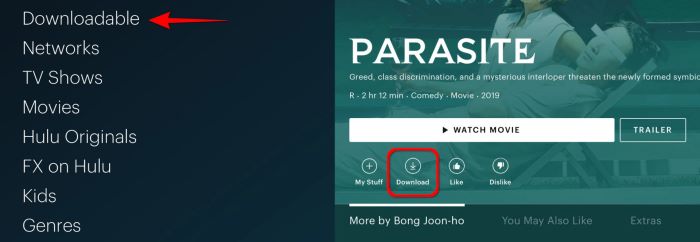
- Tap the Downloads icon in the bottom navigation bar. Select See What’s Downloadable to view all content available for offline viewing.
- Browse through the show and tap any item to open its details page.
- For TV shows, tap the Download button next to any episode that’s available for offline viewing.
- After the download finishes, go to the Downloads section from the menu bar to access your saved TV shows.
How to renew expired downloads?
Once you start watching a show or movie, you have 48 hours to finish it before the download expires. These Hulu downloads are temporary on your device, so you may need to renew them if you want to watch shows on Hulu again.
- Open the Downloads section from the menu.
- Tap the alert icon next to any expired download.
- If the option is available, select Renew Download to extend access.
Part 3: How to Download Shows on Hulu on Mac and Laptop? [100% Working]
Although the Hulu app doesn’t support downloading shows or movies on a Mac or laptop, you can easily bypass this limitation with a professional Hulu Downloader. With FlixiCam StreamOne Hulu Downloader, you can download Hulu videos directly on your Mac or Windows laptop — even if you’re subscribed to Hulu (With Ads). This means you don’t need to upgrade to the No Ads plan, yet you can still enjoy the same premium offline-viewing features.
All downloaded shows and movies are saved permanently on your device. Whether you’re using a MacBook, iMac, Windows laptop, or any other computer, your downloads won’t expire or disappear. You can also transfer your unlimited Hulu downloads to any device you like, making it easy to watch your favorite shows on an airplane, cruise, hotel, or anywhere with limited or no internet access.
Main Features:
- Batch download movies and TV shows on Hulu in 1080p.
- Support saving 5.1 Dolby surround audio and SRT/VTT subtitles.
- Download videos in MP4 or MKV from 1000+ sites, including Netflix, Amazon Prime Video, Disney+, YouTube, Max, and more.
- Support downloading subtitles & audio tracks in multiple languages.
- 10X download speed for efficient saving.
Compatibility: Windows 10/11, macOS 11 or later.
How to Download Shows on Hulu on Laptop or MacBook with FlixiCam StreamOne?
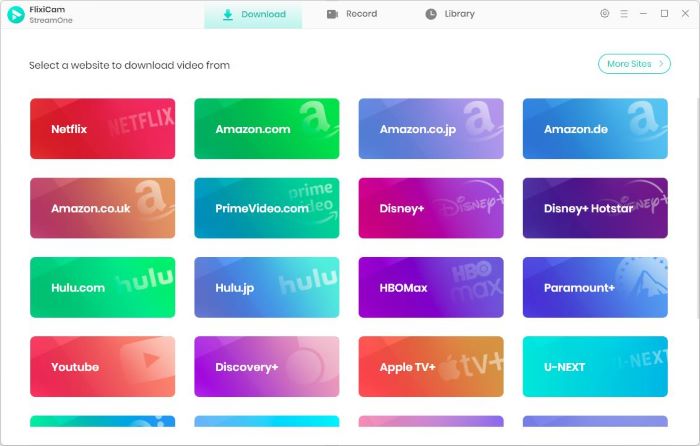
Step 1 Run FlixiCam StreamOne and Select the Target Website
Install FlixiCam StreamOne on your Windows PC or Mac and open the software. Click the Switch Website button beside the address bar, then select Hulu to load the built-in Netflix browser inside the program.
Step 2 Log in to Hulu Account and Find the Video
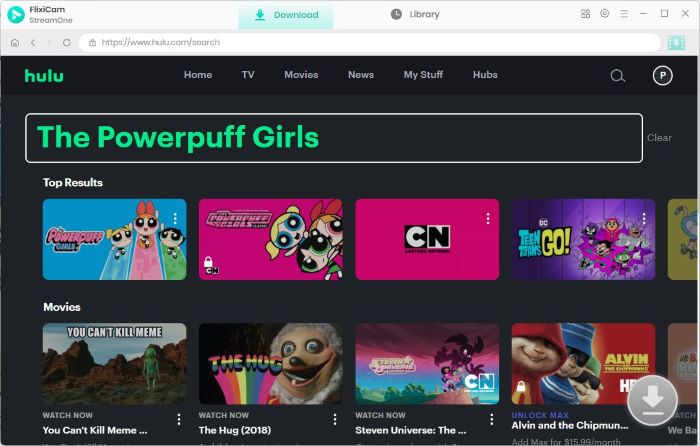
Log in with your Hulu credentials. After signing in, use the search bar to look up any show, movie, or documentary—just as you would on the official Hulu app.
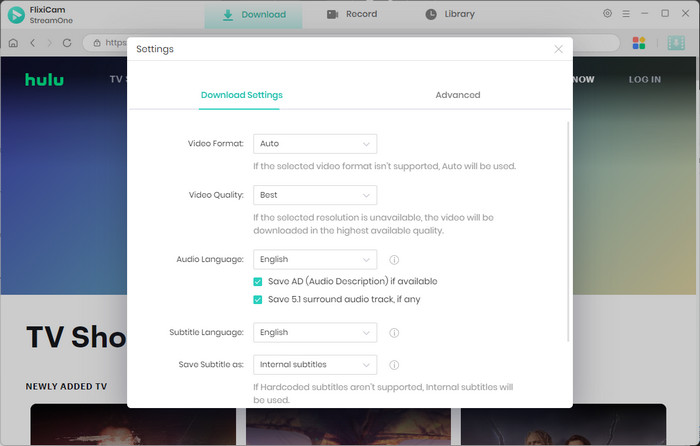
Step 3 Customize the Output Settings
Open the Settings page to customize your output options. Here, you can select your preferred video quality (up to 1080p), customize audio languages, subtitle types, and other parameters.
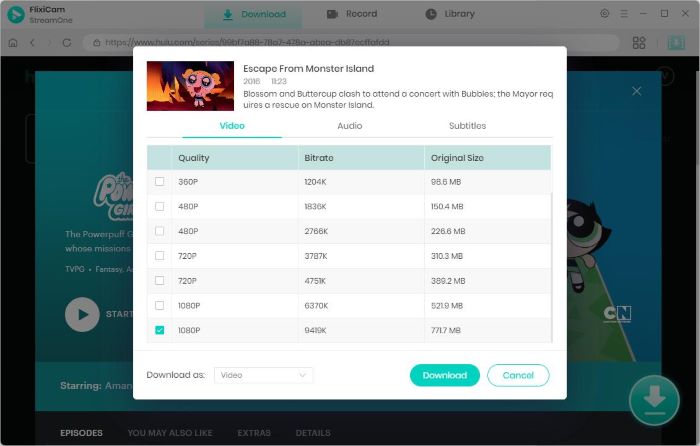
Step 4 Select Audio Track and Subtitle
Start playing the Hulu show or movie you want to save, then hit the Download icon. A settings window will appear, allowing you to choose the audio track, subtitle language, and additional details before starting the download.
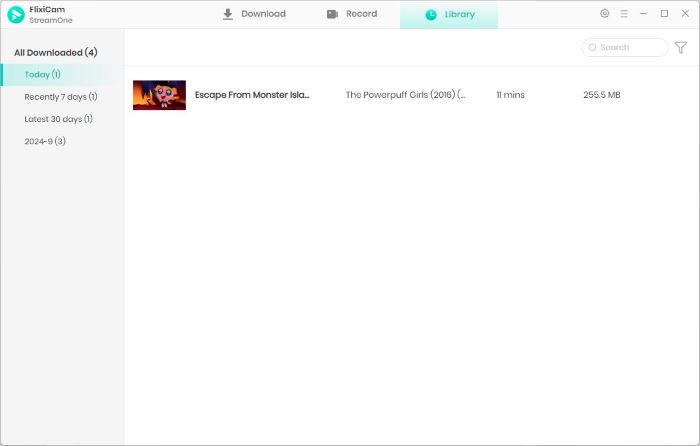
Step 5 Start to Download Videos
Click Download to start saving the video. FlixiCam StreamOne supports batch downloads, so you can add multiple episodes or movies to the queue while continuing to browse. After the process is complete, all your Hulu shows or movies become available for offline viewing on any device, with no expiration or usage limits.
Part 4: FAQs about Downloading Shows on Hulu
Why can't I download shows on Hulu?
There are several reasons why you may not be able to download shows on Hulu. The following are the possible reasons and their corresponding solutions.
1. Check your subscription plan. If you’re using the ad-supported plan, Hulu does not allow downloads on any device. Only the Ad-Free plan supports offline viewing.
2. You should also verify whether your device is compatible. Hulu only enables downloading on specific mobile devices, so make sure the device you’re using matches one of the supported models listed in the table below.
| Supported mobile device | Criteria |
|---|---|
| iPad, iPhone, iPod Touch | iOS 16.4 and later |
| Android mobile devices | Android 7.1 or higher; Screen size of at least 800x480 pixels |
| Amazon Fire Tablets | Fire 7 (9th generation or higher), Fire HD 8 (8th generation or higher), Fire HD 10 (9th generation or higher), Fire Max 11 (13th generation or higher) |
3. Make sure your device has enough available storage for the Hulu downloads. If you don't know how to check the storage on your iPhone and iPad, please check out this detailed tutorial.
4. You should also check whether your Hulu app or device software needs an update and install any available updates before retrying.
5. If the issue persists, try downloading the video again using another Wi-Fi connection.
How many shows can you download on Hulu?
Hulu allows up to 25 downloads across five supported mobile devices per account. These limits apply to the entire account—not to individual profiles or devices. If you go over the limit, Hulu will display a popup explaining what to do next.
Why can't I access my Hulu downloads?
Downloads can only be viewed within the U.S. — including Puerto Rico and U.S. military bases — and only on the device where they were originally saved.
If you want to watch Hulu content offline outside the United States, FlixiCam StreamOne is the recommended solution. The tool lets you download Hulu shows and movies in MP4 or MKV format, so you can save them permanently on any device and watch them offline from any country. No region restrictions, no expiration—just smooth playback wherever you are.
Can you watch Hulu while on a plane?
You can watch Hulu on a plane as long as your flight offers inflight Wi-Fi. In most cases, streaming is possible, but you’ll need high-speed Wi-Fi for smooth playback—and airlines usually charge extra for that.
If you don’t plan to use Wi-Fi during the flight, it’s best to download your shows in advance. With supported devices and the Hulu app, you can save selected titles for offline viewing. For more flexibility, we recommend using FlixiCam StreamOne to download Hulu shows as MP4 or MKV files, ensuring the videos stay accessible throughout long-haul flights without expiring. This approach gives you a more reliable offline experience and makes it easy to enjoy your favorite Hulu content anywhere.
Final Words:
By now, you should have a clear understanding of how to download Hulu shows across different devices. If you plan to download and watch offline on a mobile device, make sure you’re subscribed to a premium plan that supports downloads and that your device meets Hulu’s system requirements.
If you’re on an ad-supported plan or want to download Hulu shows on a laptop or MacBook, don’t worry—FlixiCam StreamOne is the perfect solution. With FlixiCam StreamOne, you can easily bypass Hulu’s restrictions and save shows as MP4 or MKV files, ensuring your downloads never expire and remain available anytime you need them. So start using FlixiCam StreamOne today and take full control of your Hulu viewing experience wherever you go.
Tessa Kirkland | Senior Writer